
For many small to medium sized businesses (SMBs), the cloud may be intimidating. It sounds appealing but they think it’s too expensive or too complex for their business. WD is trying to dispel those notions with a line of products designed to bring SMBs into the Cloud. Paul Chen, Product Line Manager at WD, answered a number of questions from people attending a recent webinar on WD’s NAS offerings for SMBs.
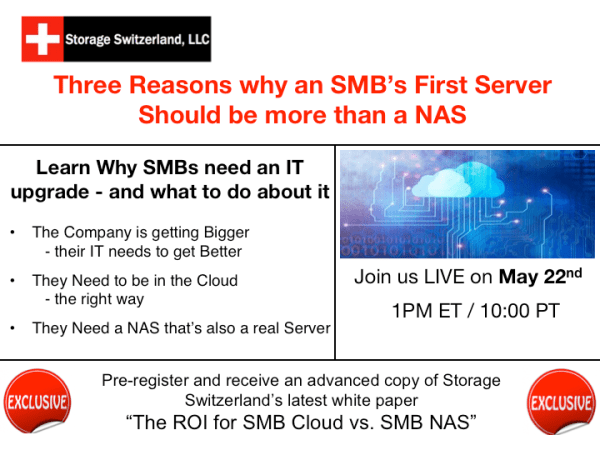
Watch the webinar “Three Reasons Why an SMB's First Server should be more than a NAS” available on-demand.
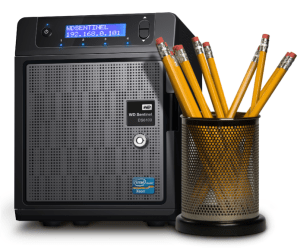
“How is the WD Sentinel more business reliable than, say, another desktop NAS that’s on the market?”
Paul: This is a good question. When you get to the traditional desktops even now, they aren’t designed for necessarily being on 24/7. If they are, they’re not utilized in a way that you’d expect from a business. If you look at the hard drives and the components that are put in to those desktops, you can see a mixture of what I call the “bag of quality”, the lack of six-sigma [referring to quality control].
Our unit was designed with a mean time between failure (MTBF) of five to six years, we obviously test well beyond that, but also, with the utilization levels that are expected by a business. That’s one way that [this products is] very different, it’s hardened for business grade. It’s not hardened as in MIL-grade, but certainly we want to let the audience know that it’s different than putting together your own desktop, or even putting together your own server, in a do-it-yourself model.
You’ve got to look at the weakest point of your product design when you’re building it yourself. Or you can take a product like ours and just deploy it and know that you’ve got assurance and reliability.
“Why did WD feel it was important to use Xeon?”
Paul: The Intel Xeon processor – I won’t go too much into processor architecture – but it was designed for servers: meaning not necessarily designed to drive a TV screen and a single client use. It was designed to have multiple users land on it, multiple applications running. So I think a traditional NAS, lets say a single-box Linux NAS, may be great at streaming one file transfer from one point to another. The balance of the Intel Xeon is in the power of being able to handle hundreds if not, into the thousands of people using it at the same time. We use an Intel Xeon E3, so we’re in the small business range of usage. It’s really good for the simple, dumb terminal application where you can see upwards of 500 people. But, your limit would be around your networking, not the processor.
Eric Slack, Storage Switzerland Senior Analyst (follow up): Okay, so that Xeon gives you the horsepower to do those file transfers – which would be the NAS piece and the backup piece, since you’ve got to get data across the network – but it sounds like it also has the horsepower to run a lot of applications at the same time.
Paul: Yes, multiple users running multiple applications at the same time on the same on the same network sort of stuff.
“What are you calling an SMB? How big of a company is that?”
Eric: I’ve seen in the press that it’s up to 1,000 employees. I think more in practice and the vernacular that we’re familiar with, it’s really anywhere from say a dozen employees to a couple of hundred. That’s typically what we call SMB – maybe with more emphasis on the “S”. There’s also small to medium sized enterprise, which is a little bit more confusing. Paul, SMB – what is it to WD’s experience?
Paul: I think that SMB for us means our lowest bar is anywhere from 15 users, 25 would be a typical case, going all the way up to 250 or so. We’ve encountered some folks who have classified themselves as a large “S” of the SMB business and you might top one data point at 500.
I would say what it means by the amount of users isn’t quite the profile that WD uses. You can have 10 employees that do as much, or need as much on a network, as 250 [employees]. It just depends on the application. As I mentioned a car dealership program running on the fleet of dumb terminals isn’t going to be as much as a design studio or maybe a software development house.
Eric: While we’re talking about SMBs let me throw this one out there.What other cloud services do SMBs need besides backup and file sharing? What other cloud services do you guys see the companies needing?
Paul: Cloud was born with storage in mind, it’s a strange circular thing. Storage was first but we’ve seen it migrate into applications, certainly into Office 365, you can see, not just the email, but Word online. Maybe the best thing to say is that the trend has swung the other way, and they’re actually becoming your business entity in the cloud, if you will. All the features of an enterprise, as well as that, we’re trying to integrate in the cloud.
We’re also seeing companies taking a vertical approach to the cloud for certain solutions. Sync is one of them, there’s also – and we use it in our unit – the built in Microsoft PinPoint site, that allows you to download applications as you want. A good portion of those applications are application-local, but i think there are about 1,000 certified programs for 2012, and a handful of those are actually cloud applications too. Syncing is a big one, it probably tops the list there, and some folks list their applications there and it’s really cloud based. Others are just tested too.
This is a very legitimate contingent to syncing up your devices in a folder, which allows for great collaboration.
Eric: So along those same lines, you can use a NAS for the hybrid appliance for multiple cloud applications, right? Can this be the on-site appliance that runs more than one cloud application?
Paul: Absolutely, theres the whole integrated thing like Microsoft Office 365, but certainly you can grow with your business on how you want to deploy your applications. You can start with one cloud application and add another. You will have to measure off the load for it, but that really works well for folks who are using it in that way.
“[Windows Server]2012 Essentials, is max 25 users, doesn’t that make this an ultra small SMB, the lower end of the SMB range? What do they mean by 25 users, is that users or computers?”
Paul: The 2012 Essentials is meant to be their SBS replacement, and the questioner is absolutely right. It is limited to 25 users in the Active Directory. On the dashboard it just looks like users but in the background it’s an Active Directory limit. They also limit the backup to 50 devices, so 2 devices per user, and that’s if you’re a business that’s 100% in to the Microsoft ecosystem and using all those tools. It’s very important to say that is indeed the limit of the O.S. if you’re using the Active Directory and the remote application so you must comply with those licenses.
What we’ve seen on the practical deployment of our product is that there are applications that run on Windows that aren’t based on Active Directory, if you will, Dropbox for businesses is on Active Directory, but certainly some things like retail programs and certainly car dealership programs won’t use that. For those who want to go beyond 25 users, you are able to grow by purchasing a standard license, and then you don’t have to reinstall Windows Server Standard, Eric, you just open up a command line, and type in a few key strokes, and this unit will move up to the Standard license. Again you do still have to comply with the Microsoft licensing, and we do have more information online and on our YouTube channel on all these things.
Eric: So what you’re saying then for your $2,500 bucks, I think that was the price you had mentioned on the slide, you’ll get a full fledged Windows OS, you get a box that can support that, but you can also upgrade that operating system to Microsoft’s next level, if you will, and the hardware stays in place. Nothing else changes and now you’ve just got a larger implementation and you just move down the road.
Paul: Yes, absolutely.
“What do you mean by ‘Do-it-yourself IT processes?”
Eric: This is what we call the “backpack DR”. For an example, you’ve got a company that needs to get their data off-site for disaster recovery kind of protection. In the old days they would carry a tape off in a backpack or a briefcase, and nowadays it’s a USB drive. So that would be an example of a way to get it done, without buying some type of elaborate piece of hardware or software to do that. Paul, anything that comes to mind when talking about this DIY IT?
Paul: The first thing that comes to mind is not just the DR, but we get a lot of solution requests coming in that I’ve had to support. And we’ve seen that a lot of the DIY networking that affects the rest of it. I guess that a better way to restate this is – people get really happy because they got onto the network, they’re happy that they can just browse, and they think of applications second, and maybe storage last. That typically is the progress, so you have to reconfigure your thought process and look at where you’re going to land your storage needs by what application you’re going to run, then look at the networking.
Again, I don’t know how many times I’ve seen the fact that they’ve reversed the order. Maybe the business is really happy that their employees can surf the web, but as soon as they start to do things in scale they fall apart. So you do need 24/7 type of servers. You also need to look at how networking works. And, as you mentioned, your disaster recovery plan as well. The DR has to take into consideration the networking as well.
“In that test drive you mentioned Microsoft’s cloud portal, does that mean this product only integrates with Microsoft’s cloud services?”
Paul: Certainly on the dashboard you’re actually going to see a “Set Up Services” tab and in there are the Microsoft services, and certainly those are well tested and you get a lot of resources and support, therefor I believe it’s Office 365, Azure, Active Directory. Windows Azure backup, and In Tune, as well as Exchange server integration. But when you go to the Applications tab, like you mentioned, the sky’s the limit on what you can add.
The Microsoft pin-point site has a lot of applications that have been pre-tested and certified, obviously it got there on the official site. The other one is just to test drive the application infrastructure. In the dashboard we’ve made a lot of OEM changes in the integration. So the Monitor tab that you would see in the DS 6100 or 5100 is actually a WD “application”. Its purpose is to monitor the temperature and send alerts, and all those kinds of things.
So the short answer is: Yes, you can integrate to different clouds, based upon what those clouds’ capabilities to run on a Windows Server 2012 R2.
Eric: So you’re saying then, that the integration is with some of the Microsoft products but through that Applications tab you can access a whole series of third party apps, kind of like the AppStore, that are written by other companies that are just designed to work with Microsoft with this operating system.
Paul: Right.

“Do small companies really have their computers in a closet?”
Eric: Actually I found that picture on the internet, I thought that was great. Actually, you know, in my experience it’s usually sitting on a desktop, or sitting on a floor next to a desk. Which is one of the reasons, believe it or not, that how loud an appliance is can be such a big deciding factor, because people have to live with it all day long. Paul, from your experience, and your customer base at WD, do companies really have closets like this?
Paul: This is a loaded question, because of course there are closets like this; and by the way setting electronic equipment next to water bottles is a bad idea. I was recently with a customer, the Miami Valley Communications Council and when you looked at the closet there, he was actually in the process of moving our Sentinel out of there. Seeing as how there may have been a wave of closet work that may be around to a certain degree exposing their data to an accidental cleaning equipment spill isn’t great. I’d like to say there’s a repurposing of those closets back into what they originally were, people had telecom equipment in there, everything just kind of got piled in there. Some of them are moving back out.
There’s another phenomena of the magical work place. We are seeing offices in San Francisco, and New York, and even close to us in L.A., trying to make the work environment be conducive to collaboration and all that, they may hire an interior designer, the interior designer isn’t going to put a closet in for you.
Lots of open spaces, a real neat work space, very Feng Shui. There’s that trend going on and there’s certainly some places that are just too small to have a closet. So that’s the reason why we made our unit small, quiet and cool.
Eric: Well, that’s probably a good point to close on this. Companies need to upgrade IT so there’s some hardware and software involved with that certainly, but there’s a very real human piece to that, as well. You have to work with this thing, and if it’s going to be sitting out where you are, and that’s a very real possibility for companies who are set up in offices where they really don’t have dedicated IT space, you can’t have a “Noisy Neighbor”… although that means something else in IT.
So, anyway, that’s about all the time we’ve got today, there are links here for myself and for Paul, go ahead and hit us if you’ve got questions or certainly check out the site as well. I guess that’s about it for myself I’m Eric Slack, and Paul Chen from Western Digital, thank you for joining us.
Watch On Demand
Western Digital is a client of Storage Switzerland

Eric is an Analyst with Storage Switzerland and has over 25 years experience in high-technology industries. He’s held technical, management and marketing positions in the computer storage, instrumentation, digital imaging and test equipment fields. He has spent the past 15 years in the data storage field, with storage hardware manufacturers and as a national storage integrator, designing and implementing open systems storage solutions for companies in the Western United States. Eric earned degrees in electrical/computer engineering from the University of Colorado and marketing from California State University, Humboldt. He and his wife live in Colorado and have twins in college.


 StorageSwiss.com - The Home of Storage Switzerland