
Dashboard-defined VMware alternatives assemble hypervisors, storage services, networking tools, and protection utilities from separate projects, then present them through a modern dashboard that creates the appearance of a unified platform. The interface improves usability and simplifies many daily operations. It does not change how independently these components operate beneath the surface. This distinction matters because long-term stability depends on how these layers interact architecturally. Mobility behavior, failover timing, and recovery consistency rely on coordination across the stack, not on how smoothly a dashboard presents the environment.
VMware set this expectation. It delivered a unified operational experience even though several components ran independently behind the scenes. vCenter succeeded because it masked complexity, not because it removed it. Many VMware alternatives follow the same pattern, yet the ability to mask complexity varies widely across dashboard-defined platforms. The question for organizations leaving VMware is whether this model will be enough to meet the next decade’s infrastructure demands.
Understanding this distinction requires examining how these alternatives are actually constructed.
📘 Key Terms (optional)
Dashboard-defined platform: Infrastructure assembled from independent components presented through a unified interface.
Architecturally unified platform: Infrastructure where compute, storage, networking, and protection share a single codebase and metadata structure.
Infrastructure Operating System: A platform that treats virtualization, storage, and networking as coordinated services within one operating system rather than separate products.
What Are Dashboard-Defined VMware Alternatives?

The VMware alternatives market expanded quickly, yet most emerging platforms follow a similar structure. They combine a KVM-based hypervisor with separate layers for storage, networking, automation, and sometimes AI or analytics. Different open source projects or commercial partners contribute these layers, each with its own roadmap and development priorities. To create a coherent experience, vendors layer a dashboard that, with varying levels of success, tries to hide the complexity of the underlying systems. The result is a platform assembled from distinct technologies that behave independently even when presented through a common interface.
VMware has separate development teams for ESXi, vCenter, vCloud Director, NSX, and vSAN, yet all those teams work within the same company. They report through a unified management structure that kept development roughly in sync. The architectural alignment was not perfect, but it reduced the risk of significant drift and allowed VMware to build a consistent operational model that customers trusted. This level of internal coordination does not exist across the independent projects that form most KVM-based solutions.
The contrast becomes more visible as organizations expand their evaluations. A typical KVM-based environment might use a hypervisor from one project, storage from another, networking from a third, and protection from yet another vendor or community tool. Each follows its own logic for updates, tuning, and diagnostics. Administrator effort increases as more layers join the platform. Teams manage separate update schedules for KVM, Ceph, Open vSwitch, and backup tools. Each requires its own diagnostic process during failures. As a result, the environment becomes more sensitive to configuration drift and timing issues across subsystems.
The Dashboard-Defined Challenge: Multi-Layered Complexity
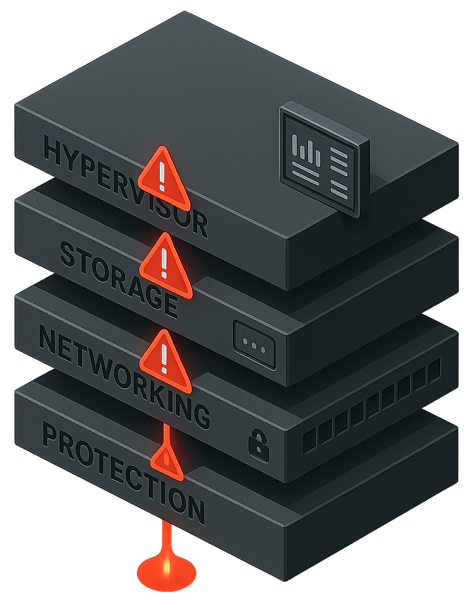
Most VMware alternatives present a dashboard interface that gives the impression of a unified platform. The interface improves usability, yet the components beneath it still operate independently. A KVM-based hypervisor may function well on its own, but it does not dictate how storage services behave. Software-defined networking follows its own rules for configuration and recovery. Protection and orchestration tools add their own schedules, tuning requirements, and diagnostic paths. These layers do not share a common architectural foundation.
The separation becomes more apparent when organizations place real pressure on the environment. The challenges emerge as clusters grow, workloads diversify, and availability expectations rise. This is especially true during disaster recovery situations. Orchestrating these components to come online with all data in sync is a significant challenge and a primary source of delayed recovery. Each subsystem maintains its own state and assumptions, increasing the number of variables engineers must manage during high-stress events.
The dashboard tries to hide as much of this multi-layered structure as possible during evaluation, yet the underlying complexity surfaces once the platform is used at scale and when the system is placed under performance or recovery stress. Environments begin to feel less like a single system and more like a collection of loosely connected parts. Teams that expect the platform to behave as one discover that consistency depends on operator effort rather than architectural cohesion.
Masking Complexity Is No Longer Enough
VMware succeeded by masking complexity rather than eliminating it. vCenter provided a consistent dashboard experience despite the underlying components being separate. For many years, this approach served the industry well. It allowed organizations to expand clusters, add services, and support a wide range of workloads without rethinking the platform’s structure.
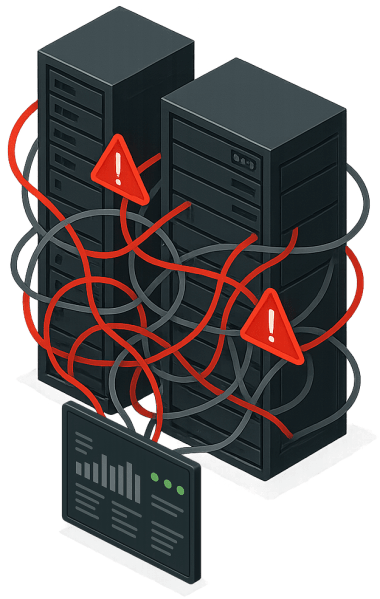
The landscape has changed. Workloads place greater demands on mobility, recovery speed, and scale. Data protection expectations have increased as outages and cyber events become more disruptive. Many environments now span multiple sites, multiple hardware generations, and a broader mix of applications. Hiding complexity through an interface does not resolve the coordination required when these conditions converge.
Modern infrastructure needs deeper alignment across compute, storage, networking, and protection than the masking approach can provide. The ability to shift workloads quickly, recover from incidents without delay, and grow clusters without drift depends on how tightly these functions work together. A GUI can simplify daily tasks, but it cannot provide the architectural unity required for environments that demand automation, rapid recovery, and long-term efficiency.
Organizations evaluating VMware alternatives must decide whether they want a platform that hides complexity behind a dashboard or one that reduces complexity at the architectural level. The difference is essential for teams that need more than a replacement hypervisor and want an environment that positions infrastructure for the next decade.
Architecturally Unified VMware Alternatives
An architecturally unified VMware Alternative brings the core functions of virtualization, storage, networking, and protection into a single architectural structure and code base. It makes each of these components services within an infrastructure operating system rather than standalone products.
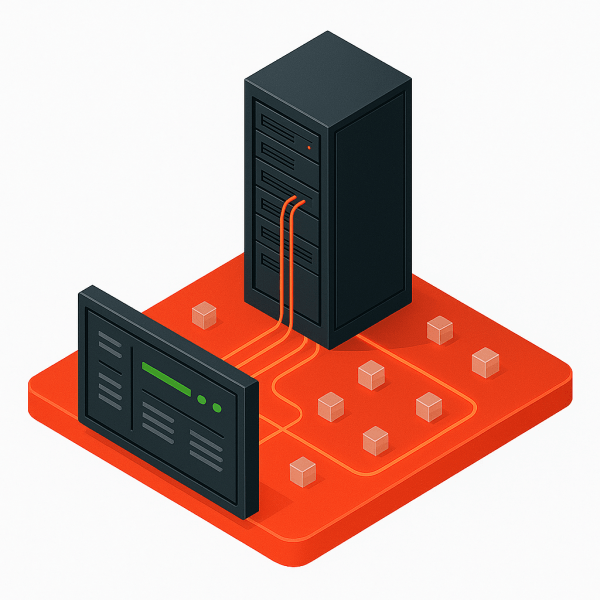
Each service draws from the same metadata, eliminating the need for separate communication paths and reducing the number of decisions that must be reconciled across subsystems. The environment behaves as a single platform because the design enforces that behavior internally rather than relying on operators to maintain alignment.
An architecturally unified VMware Alternative improves recovery timing, mobility consistency, and scaling behavior. Context switching is immediate because each function uses the same resource model and placement rules. Storage no longer waits for network updates, and protection no longer reconstructs state from separate modules. The platform manages its own coordination, reducing operational overhead and lowering the risk of drift as clusters grow or workloads become more distributed. This model lays a foundation that supports modern demands, such as stronger recovery objectives, predictable multi-site growth, and the inclusion of advanced services like private AI, without adding new layers of complexity.
Integration at this level also changes how platforms handle bottlenecks and contention. When functions operate within a single code base, the system can evaluate resource usage holistically rather than through separate schedulers. Decisions about placement, replication timing, or network routing can take into account current conditions across the entire cluster. This provides more stable performance under load and reduces the likelihood of cascading delays during recovery events. These characteristics define the architectural difference between systems that appear unified through an interface and systems that operate as unified platforms by design.
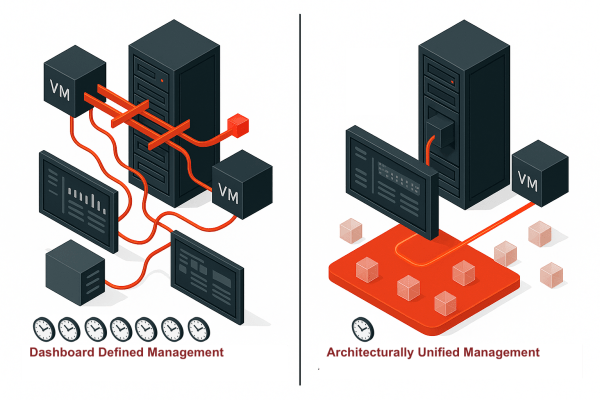
Integration becomes most visible during disaster recovery. When virtualization, storage, networking, and protection share the same metadata and architectural rules, the platform can bring resources online in a coordinated sequence without waiting for independent services to reconcile their states. Replicas become immediately accessible because the system already understands placement and connectivity. Networks attach cleanly because routing and segmentation follow the same internal model. Failover completes faster because recovery does not depend on external orchestration or cross-component negotiation. This is the practical advantage of integration in action.
Dashboard-Defined vs Architecturally Unified Comparison
| Characteristic | Dashboard-Defined | Architecturally Unified |
|---|---|---|
| Component Integration | Separate projects unified by UI | Single codebase |
| Metadata Structure | Independent per subsystem | Shared across all functions |
| Update Management | Multiple independent cycles | Single unified cycle |
| Troubleshooting | Multi-domain expertise required | Unified diagnostic path |
| Failover Coordination | External orchestration | Internal platform logic |
| Configuration Drift Risk | High | Low |
| Operational Complexity | Masked by interface | Reduced by design |
An Example of an Architecturally Unified VMware Alternative
Integrated platforms are still rare in the VMware alternative market, yet they illustrate what a different path can look like. VergeOS exemplifies this approach. The platform is KVM-based, but VergeIO unifies virtualization, storage, networking, mobility, and protection into a single Infrastructure Operating System and unified codebase. Its hypervisor, VergeHV, is developed in the same code base as VergeFS for storage, VergeFabric for networking, and VergeIQ for private AI. Each component follows the same architectural rules because the system maintains one metadata structure across all nodes.
Integration at this level also reduces the number of layers the software must navigate. This structure enables VergeOS to deliver near-bare-metal performance and extend server longevity by minimizing translation overhead. The design also reduces the number of layers administrators must coordinate, which changes how the environment behaves during mobility, scaling, or recovery. Decisions spanning multiple functions no longer rely on external alignment because the platform evaluates state holistically. Failover becomes faster because storage, networking, and virtualization share the same understanding of placement and connectivity. Multi-site growth becomes more predictable because the rules governing the cluster originate from a single system rather than a collection of projects.
Key Takeaways
- Dashboard-defined VMware alternatives assemble independent components behind a unified interface but do not resolve architectural fragmentation.
- Fragmentation increases coordination effort during mobility, recovery, and scaling events.
- Interface quality cannot compensate for independent subsystems during high stress scenarios such as disaster recovery.
- Architecturally unified platforms share one metadata structure and one codebase, which reduces complexity by design.
- Choosing a VMware alternative is an architecture decision that shapes the next decade of infrastructure operations.
Frequently Asked Questions About VMware Alternatives
What is a dashboard-defined VMware alternative?
A dashboard-defined VMware alternative assembles separate hypervisor, storage, networking, and protection components behind a unified management interface. The dashboard creates the appearance of integration without architectural unity.
What is an architecturally unified VMware alternative?
An architecturally unified platform integrates virtualization, storage, networking, and protection into a single codebase with shared metadata. This eliminates coordination overhead between independent subsystems.
Why does VMware alternative architecture matter?
Architecture determines mobility behavior, recovery timing, and scaling consistency. Dashboard-defined platforms require operator coordination across subsystems. Unified platforms manage coordination internally.
What is an example of an architecturally unified VMware alternative?
VergeOS is an example. It unifies compute, storage, networking, mobility, and protection inside a single Infrastructure Operating System with one metadata model.
Conclusion
This distinction between dashboard-defined and architecturally unified platforms is the central question organizations must address as they plan their VMware exit. The future of infrastructure will favor platforms that reduce complexity rather than mask it. VergeOS provides one example of this approach, but the principle applies across the entire market. The decision is not which hypervisor to adopt, but which architecture will carry the environment for the next ten years?

George Crump is the Chief Marketing Officer at VergeIO, the leader in Ultraconverged Infrastructure. Prior to VergeIO he was Chief Product Strategist at StorONE. Before assuming roles with innovative technology vendors, George spent almost 14 years as the founder and lead analyst at Storage Switzerland. In his spare time, he continues to write blogs on Storage Switzerland to educate IT professionals on all aspects of data center storage. He is the primary contributor to Storage Switzerland and is a heavily sought-after public speaker. With over 30 years of experience designing storage solutions for data centers across the US, he has seen the birth of such technologies as RAID, NAS, SAN, Virtualization, Cloud, and Enterprise Flash. Before founding Storage Switzerland, he was CTO at one of the nation's largest storage integrators, where he was in charge of technology testing, integration, and product selection.


 StorageSwiss.com - The Home of Storage Switzerland