
Key Takeaways
- AI prototypes fail in production not from model or data problems, but from five infrastructure gaps: recoverability, reproducibility, isolation, lifecycle management, and disaster recovery
- Every gap has a direct cost in rebuild time, environment drift, audit failure, and knowledge loss that compounds as organizations scale AI initiatives
- AI production infrastructure must capture the full environment as a single unit, assign GPU resources with enforceable boundaries, and centralize lifecycle management
- GPU virtual workstations bring AI workloads into the same operational model IT teams already apply to CPU-based compute
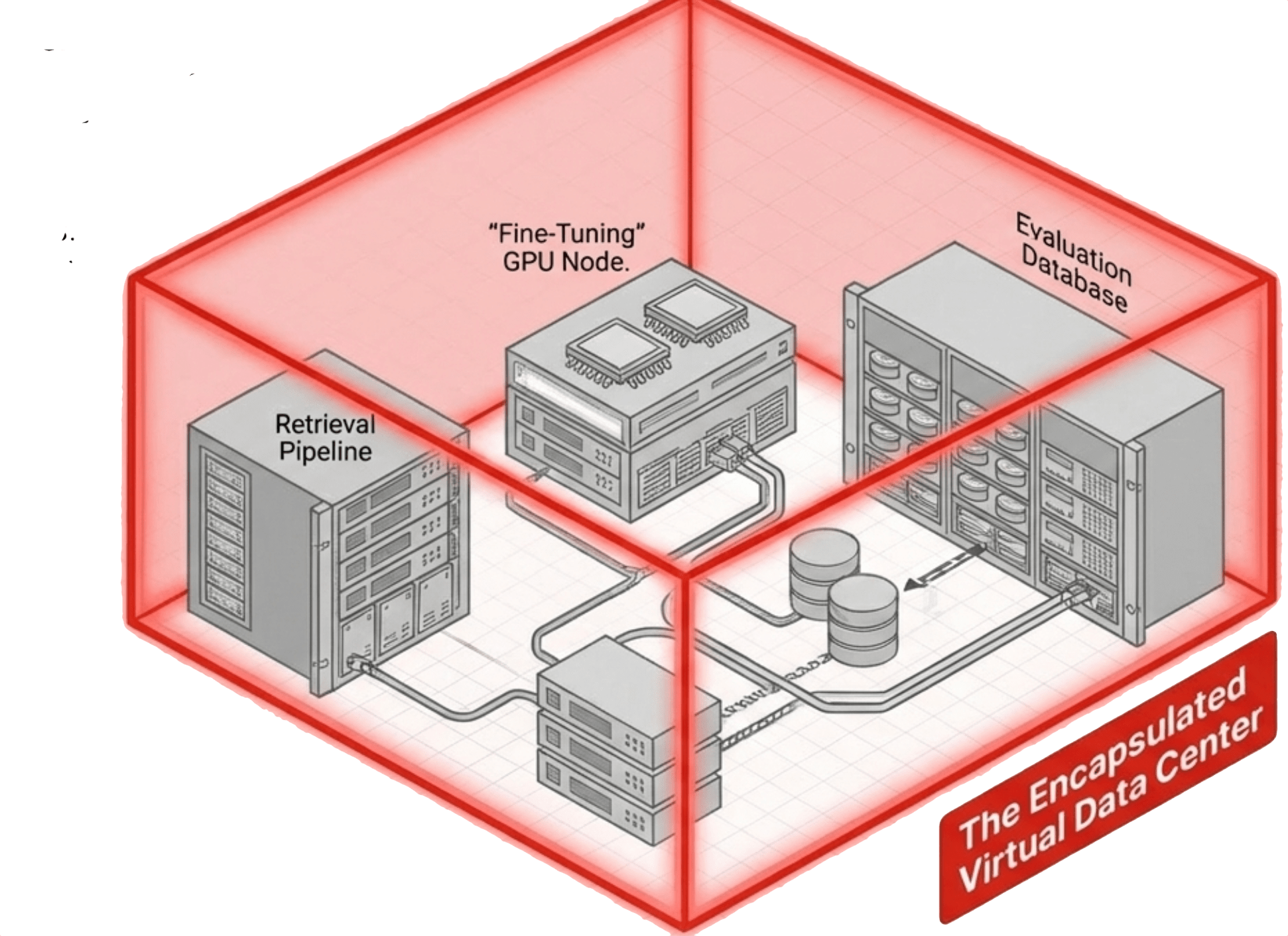
- Virtual data centers encapsulate entire multi-workstation environments so teams can snapshot, clone, and recover at the organizational level, not the VM level
- VergeOS treats GPU workloads as a first-class platform function, managing pass-through, vGPU, and MIG through the same unified control plane as compute, storage, and networking
What “Working” Looks Like on a Developer’s Machine
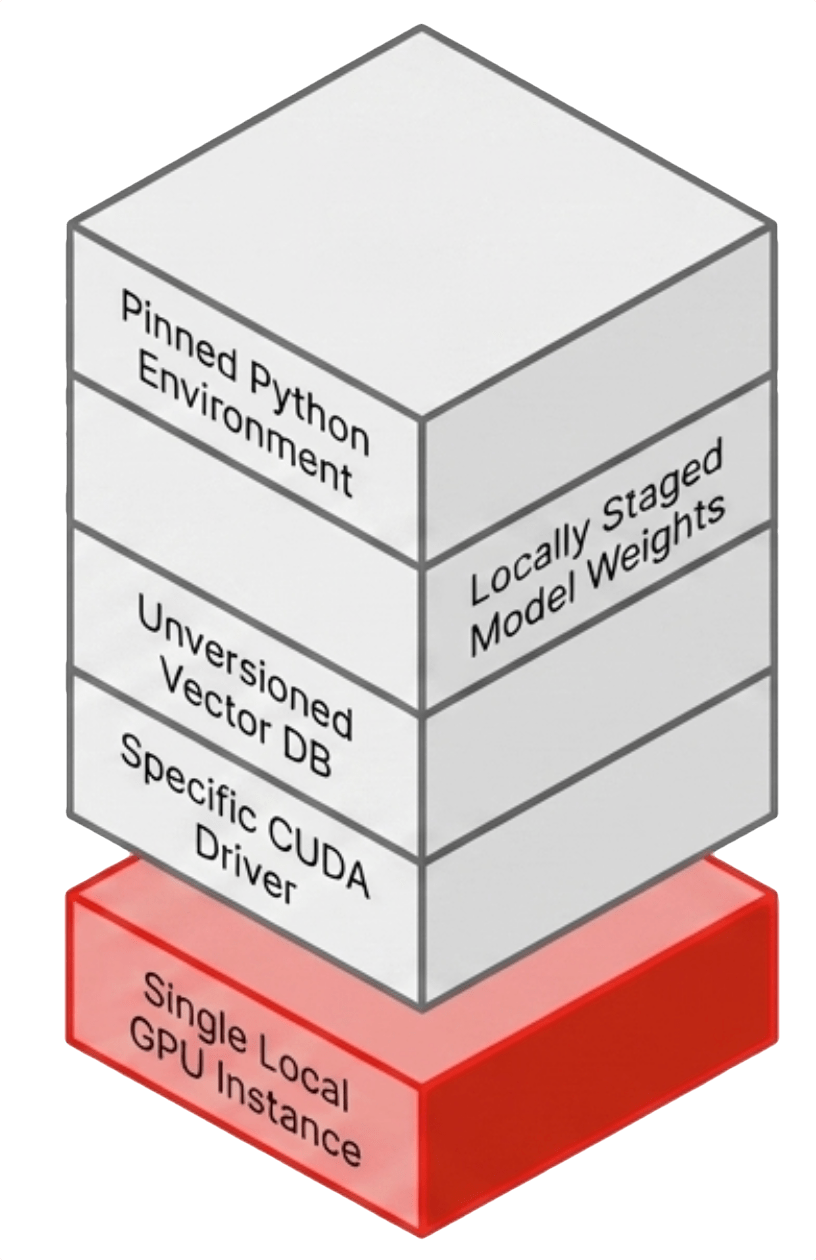
A typical AI prototype runs in a tightly controlled environment that exists in exactly one place. A physical workstation or a single cloud instance with GPU access. The environment includes a vector database loaded with embedded documents, model weights staged locally or pulled from a repository, application configuration files, and a Python environment pinned to specific versions.
That environment represents days or weeks of iterative tuning. CUDA driver versions align with framework requirements. The embedding model output matches the vector database schema. Memory fits within the constraints of the GPU. Every component has been adjusted until the system stabilizes.
It works precisely for that reason. It is fragile.
There is no backup policy, no replication path, and no immutable record of the environment state. If the underlying storage fails or the GPU becomes unavailable, recovery means manual reconstruction. If another team needs the same capability, the only path is repeating the full build process.
Even success introduces risk. The environment exists as a point-in-time configuration with no version control at the system level, and no authoritative record ties a specific model version, dataset, and dependency set to a specific result.
The prototype works, but the system around it does not exist.
The Five Infrastructure Gaps That Kill AI Projects
The transition from prototype to production fails in predictable ways. The failure points are not related to AI frameworks. They are the same operational gaps that have existed in every new workload class before it matured.
Recoverability. An AI environment is not a collection of independent components. Model weights, vector data, application logic, and runtime dependencies operate as a single system. Treating them as separate recovery objects creates a dependency chain that breaks under pressure. Recovery becomes a sequence of manual steps instead of a single operation.
Reproducibility. A second environment should be identical to the first, but in practice the team rebuilds it from scratch. Driver versions shift, Python packages resolve to different dependencies, and database schemas evolve. The differences are subtle, but they change behavior. Teams spend more time diagnosing drift than building capability.
Isolation. GPU sharing without enforced boundaries creates contention. One workload consumes memory bandwidth or compute cycles and starves another. Scheduling becomes reactive and performance becomes unpredictable. Without hardware-level partitioning, shared GPUs behave like overcommitted CPUs without a scheduler.
Lifecycle management. GPU drivers, CUDA libraries, and AI frameworks are tightly coupled. Updating one component impacts the others. In a prototype, this coupling is hidden. In production, it becomes a change management problem. Without centralized control, updates break working environments.
Disaster recovery. Most AI prototypes exist in a single location with no replication target, no failover mechanism, and no tested recovery plan. The failure domain is the entire project, and a single hardware issue becomes a business interruption.
These are not new problems. They are familiar problems that AI production infrastructure has not yet addressed for GPU workloads with the same discipline applied to CPU workloads.
| Operational Domain | The Prototype Reality | The Production Requirement |
|---|---|---|
| Recoverability | Dependency chain breaks under pressure | Captured as a single immutable unit |
| Reproducibility | Manual rebuilds lead to system drift | Cloned on demand as identical copies |
| Isolation | Shared resources create unpredictable contention | Hardware-level partitioned boundaries |
| Lifecycle | Decentralized, manual driver updates break things | Centralized, versioned control plane |
| Disaster Recovery | Failure domain is the entire isolated project | Entire environment replicated for 1-step restore |
Key Terms
- AI Production Infrastructure
- The operational layer beneath AI applications that provides recoverability, reproducibility, isolation, lifecycle management, and disaster recovery for GPU-based workloads at scale.
- GPU Virtual Workstation
- A virtual machine with assigned GPU resources that serves as the primary unit of operation for AI workloads, inheriting platform-level snapshot, replication, cloning, and recovery capabilities.
- Virtual Data Center (VDC)
- A higher-level construct that encapsulates multiple virtual machines, their networking, and their storage relationships into a single manageable unit, aligning infrastructure operations with team-level workflows.
- Environment Drift
- The divergence that occurs when manually rebuilt environments differ in driver versions, Python dependencies, database schemas, or configuration, producing inconsistent behavior across what should be identical systems.
- MIG (Multi-Instance GPU)
- A hardware-level GPU partitioning feature that carves a single GPU into isolated slices, each with its own compute engines, memory, and bandwidth, enforced in silicon rather than software.
- NVIDIA vGPU
- A software virtualization stack that partitions a physical GPU into multiple virtual instances, each running a full NVIDIA driver inside the guest OS with dedicated VRAM allocation.
What It Costs When These Gaps Stay Open
The cost of these gaps compounds as organizations attempt to scale AI initiatives beyond isolated projects, and the compounding is not gradual. Each new team, each new use case, and each new compliance requirement amplifies the operational debt that accumulates when AI environments lack proper infrastructure.
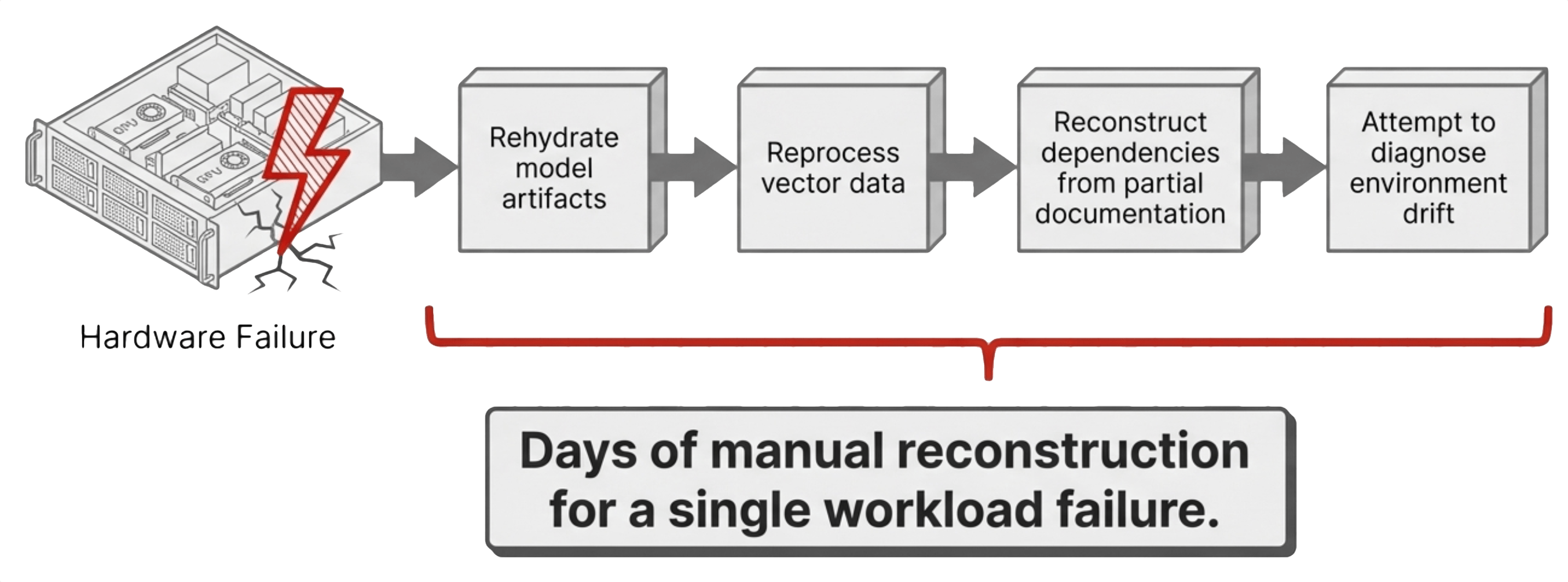
Knowledge concentrates in individuals, and when those people leave, the organization loses the ability to maintain or extend the system. The team returns to the prototype phase, rebuilding capability that already existed. Each of these outcomes carries a direct cost in time, effort, and opportunity. More important, they introduce uncertainty into systems that are expected to produce consistent, explainable results. Organizations that treat AI environments as disposable absorb these costs every time something changes. Organizations that invest in AI production infrastructure absorb them once.
What AI Production Infrastructure Requires
The requirements for AI production infrastructure are not new. They are extensions of existing operational models that IT teams have refined over two decades of CPU-based virtualization, now applied to a workload type that has outgrown its prototype-stage tooling.
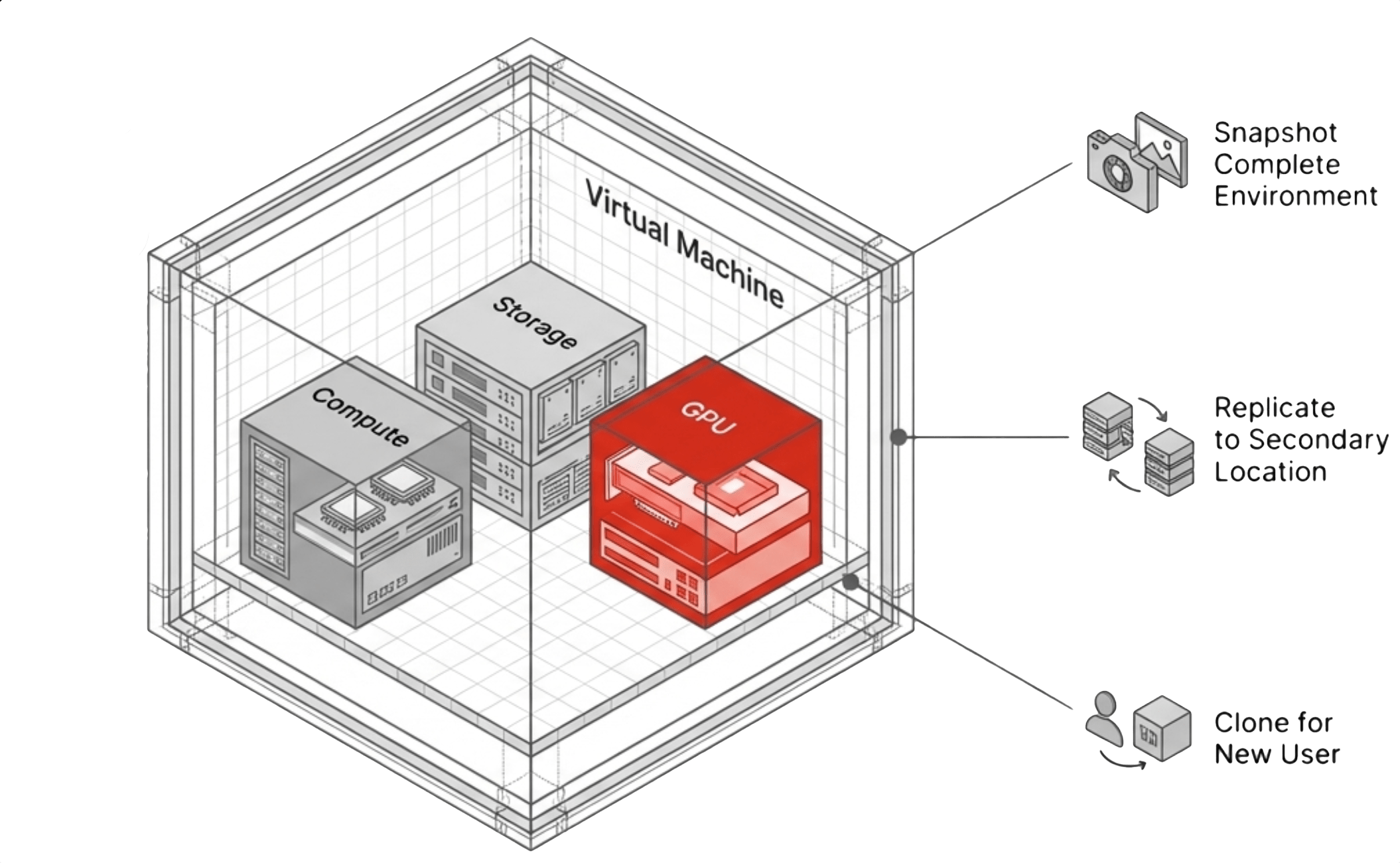
The platform must capture the full environment as a single unit, with snapshots that include model state, vector data, application configuration, and runtime dependencies together. Replication must move that unit across locations without manual reassembly at the destination. Cloning must create identical copies on demand so that scaling from one team to five is an infrastructure operation rather than a week-long rebuild project.
Resource allocation must be deterministic, with the platform assigning GPU resources through enforceable boundaries that prevent one workload from starving another. Lifecycle management must be centralized so the platform versions, distributes, and rolls back driver versions, CUDA stacks, and AI frameworks as part of normal operations rather than as manual tasks performed on individual hosts. Disaster recovery must operate at the environment level, restoring the complete system rather than forcing the team to rebuild it from scattered components.
These capabilities are standard in CPU-based virtualization, and every IT team already applies them to traditional compute. The challenge facing AI production infrastructure is delivering the same discipline for GPU-based workloads without introducing new layers of complexity or new management planes that fragment operations.
The Virtual Workstation Model
Virtual Data Centers: Encapsulation Beyond the VM
What to Evaluate in a GPU Infrastructure Platform
Selecting a platform for AI workloads requires evaluating how well it addresses these operational requirements across six dimensions that separate platforms built for GPU workloads from those that treat GPU support as an afterthought.
The first is the provisioning model: whether a general infrastructure administrator can deploy GPU-backed environments through a standard interface or the process requires specialized GPU expertise and command-line tools. The second is driver and stack management: whether the GPU software stack is managed centrally with version control, distribution, and rollback or whether each system requires manual configuration on individual hosts.
Resource isolation determines whether GPU resources are partitioned with enforceable boundaries at the hardware level or shared on a best-effort basis without guarantees. Data protection scope determines whether snapshots and replication capture the complete environment, including model weights, vector data, and runtime dependencies, or only portions of it that leave recovery incomplete.
Management consistency evaluates whether GPU resources are integrated into the same control plane as compute, storage, and networking or managed through a separate tool chain that fragments operations. Environment-level operations evaluates whether entire multi-system environments can be managed as single units or the platform limits operations to individual machines. Together, these six criteria determine whether the platform reduces operational complexity or shifts it onto the infrastructure team.
VergeOS: Treating GPU Infrastructure as a First-Class Platform Function
VergeOS addresses these requirements by treating GPU workloads as part of a unified infrastructure system rather than layering GPU support onto an existing stack as an afterthought. The platform discovers and integrates GPU hardware automatically and operates driver management as a centralized function. Administrators define and distribute GPU configurations without interacting with hardware-level tooling or running nvidia-smi from the command line.
NVIDIA’s vGPU support alignment means the GPU software stack and the infrastructure platform operate within a validated configuration. Both vendors stand behind the deployment through coordinated support paths rather than finger-pointing when issues surface. The result is an infrastructure model where deploying an AI workload follows the same process as deploying any other application, and the platform absorbs the complexity rather than pushing it onto the team.
See GPU Virtualization in Action
Watch how VergeOS delivers vGPU, pass-through, and MIG in a unified private cloud environment on your existing hardware.
The Bottom Line
The tools to build AI applications are mature, and every organization understands the path from concept to working prototype. The challenge is not creating capability. The challenge is sustaining it across teams, across time, and across the inevitable hardware failures, personnel changes, and compliance demands that every production system faces.
AI prototypes fail in production when they depend on environments that cannot be reproduced, recovered, or managed at scale, and infrastructure determines whether an AI initiative becomes a lasting system or remains a one-time demonstration. Organizations that establish AI production infrastructure for GPU workloads remove this barrier entirely. They convert AI projects from isolated efforts into repeatable deployments where each new project builds on a stable foundation instead of starting from scratch.
When that shift occurs, the conversation inside the organization changes. The question is no longer how to rebuild environments or how to recover from the last failure. The question becomes how quickly new applications can be delivered on top of an infrastructure layer that already handles the operational complexity.
Frequently Asked Questions
Why do AI prototypes fail when they move to production?
AI prototypes fail in production not from model or data shortcomings, but from infrastructure gaps. The environments that power prototypes lack recoverability, reproducibility, isolation, lifecycle management, and disaster recovery. These are the same operational requirements IT teams have solved for CPU workloads but have not yet addressed for GPU-based AI workloads.
What is AI production infrastructure?
AI production infrastructure is the operational layer that provides snapshots, replication, cloning, resource isolation, centralized lifecycle management, and disaster recovery for GPU-based AI environments. It treats AI workloads with the same discipline organizations already apply to traditional compute, bringing them into a managed, repeatable, and recoverable state.
What is a virtual data center and why does it matter for AI teams?
A virtual data center encapsulates multiple virtual machines, their networking, and their storage relationships into a single manageable unit. For AI teams that operate five or six GPU workstations configured for different tasks, this means the entire environment can be snapshotted, cloned, or recovered as a single operation instead of managing each VM individually.
How does VergeOS handle GPU virtualization differently from other platforms?
VergeOS treats GPU resources as a first-class platform function rather than an add-on. GPU pass-through, vGPU, and MIG are managed through the same unified interface as compute, storage, and networking. The platform discovers GPU hardware automatically, centralizes driver management, and extends snapshot, replication, and disaster recovery capabilities natively to GPU-enabled workloads.
What should IT teams evaluate when selecting a GPU infrastructure platform?
IT teams should evaluate six criteria: provisioning complexity (can a generalist deploy GPU environments), driver lifecycle management (centralized or manual), resource isolation (hardware-enforced or best-effort), data protection scope (full environment or partial), management consistency (unified control plane or separate tools), and environment-level operations (team-level snapshots or VM-only).

George Crump is the Chief Marketing Officer at VergeIO, the leader in Ultraconverged Infrastructure. Prior to VergeIO he was Chief Product Strategist at StorONE. Before assuming roles with innovative technology vendors, George spent almost 14 years as the founder and lead analyst at Storage Switzerland. In his spare time, he continues to write blogs on Storage Switzerland to educate IT professionals on all aspects of data center storage. He is the primary contributor to Storage Switzerland and is a heavily sought-after public speaker. With over 30 years of experience designing storage solutions for data centers across the US, he has seen the birth of such technologies as RAID, NAS, SAN, Virtualization, Cloud, and Enterprise Flash. Before founding Storage Switzerland, he was CTO at one of the nation's largest storage integrators, where he was in charge of technology testing, integration, and product selection.


 StorageSwiss.com - The Home of Storage Switzerland
Leave a comment