
SQL Server Databases may no longer represent the largest capacity requirement in the data center but they often represent the application with the highest performance requirement. As a result, IT planners often place SQL data on high performance storage systems that are able to support hundreds of high-speed hard drives. Not surprisingly, data centers are now looking to flash based storage to better address the performance demands of SQL Server based applications.
Since flash based storage comes at a premium price, IT planners try to use it as sparingly as possible. It becomes important to confirm that the SQL Server environment can take full advantage of solid state disk (SSD). Understanding which specific components would benefit most by being on SSD is another top priority for infrastructure designers.
It’s More Than Performance – Scale Reduces Cost
It is also important to understand that flash enables more than just great performance, it also enables scale. Thanks to SSD, a single database instance and/or server is able to achieve much higher user count and application scale per instance than it could with hard disk based technology. While storage I/O is not the only SQL performance culprit it is one of the most common. If storage I/O is the problem, leveraging SSD can potentially save the cost of having to buy additional server capabilities like RAM and processing power, it also eliminates the complexity of database “sharding” or clustering. Sharding is the process of dividing up sections of a large database to execute on different servers with different storage I/O channels. SQL Server clusters introduce the complexity of cluster management and clustered file systems.
How to Know That Your SQL Environment is Ready for SSD
The first item to look for when determining the SQL Server storage environment’s SSD readiness is CPU utilization of the physical server. For SSD to provide any performance improvement, the CPU utilization needs to be relatively low; typically less than 30%. Essentially, IT planners should want the CPU to indicate that it is waiting on something, most likely the storage system. High CPU utilization is an indicator of poor code or simply underpowered processing abilities. In either case, these items need to be fixed prior to considering SSD.
It is important to capture CPU utilization statistics prior, during and after a performance problem becomes apparent to the users, in order to establish a meaningful baseline. Operating system tools are ill equipped to capture this information since they have to be manually executed. It is important for the analysis of resource utilization to be continuous. Tools like those from SolarWinds allow for the CPU activity to be captured continuously and then “played back” to see what the utilization was during the performance problem. If that CPU activity was low while the performance problem was occurring, then it is safe to assume that storage performance is the likely culprit.
Storage Statistics
Once it has been confirmed that I/O performance is the problem, the IT Planner can focus on storage. The primary statistic to look for is the queue depths of the storage system. Queue depth as it relates to storage is the number of pending I/O operations. Typically these are being queued up by the storage controller as the hard drives process all the I/O requests sitting in the queue in front of them.
Before SSD was available as a performance enhancing option, queue depth was typically reduced by adding more disk drives to the volume that the database was writing to. The more drives in the volume, the more I/Os that can be processed at any given time. In large database environments, this can lead to database volumes with hundreds of hard drives.
By comparison, a single SSD can often reduce to zero a queue depth that may have required dozens of hard drives. This made SSD not only a better performance option, it also made it a less expensive option. A single SSD can outperform an array of hard drives while using substantially less power and space.
Like CPU utilization, it is important to understand 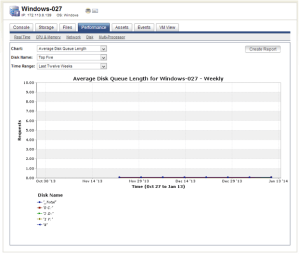 the queue depth of the database’s volume prior to, during and after the performance problem occurs. Once again, this requires that the volume be under constant monitoring with tools like those provided by SolarWinds. If during the performance problem, queue depth spikes very high, then adding drives or SSD will certainly help. In short, the higher the queue depth, the more appropriate it is to add SSD to the environment.
Getting Granular With Databases
The advantage of being able to focus specifically on SQL Server database performance instead of the performance of the server as a whole, is that the performance variables can be more targeted. This “targeting” requires being able to “see inside” the database so that specific files can be examined for performance problems. There are four main categories of files in a SQL environment: User Databases, System Databases, TempDB files and log files. Each of these types should be examined for SSD worthiness.
The most obvious solution is to put the entire database environment on a SSD array, but this can be impractical because the cost of an SSD that size might exceed the budget for the project. It also may be unnecessary because the bulk of the SQL environment’s I/O activity is going to occur in the transaction logs. All new data and modified data first go to these logs. The logs are then written to the actual data file via a lazy write method, basically the write occurs when system activity is low. The result is that SQL does not typically try to write to both the logs and the data files at the same time.
For many environments, SQL transaction performance can be substantially improved by just moving the log files to SSD. The downside of flash technology, however, is that it has a finite number of times it can be written to. That number varies between Single-Level Cell (SLC) and Multi-Level Cell (MLC), with SLC allowing for the largest number of writes because of its increased durability. These logs should be monitored prior to SSD purchase to see how much data is written to them in a day. If it is high, SLC technology should be considered over the less expensive MLC so it can provide uninterrupted performance acceleration to the environment.
Queries of database information typically count on index files. In the same way that transaction files are moved to SSD, index files can be moved to SSD to improve query results. But even though they are a subset of the actual data, indexes can be very large and it may be too expensive to place them on SLC based SSDs. Indexes however are much more read heavy and are more suitable for MLC based technology.
The key is knowing which of these files to place on SSD. Again with the appropriate tools, these files can be constantly monitored to see which ones are the most active during a performance problem. In most cases, the problem files are a fraction of the overall size of the environment. Some database environments can see a significant performance improvement by placing a mirrored set of SSDs in the server and then storing all the user and system databases on a shared storage system. Moving these files to specific locations is also relatively easy to do within the SQL configuration controls. A storage admin working with the DBA can place the larger, read-heavy index on a more cost effective per GB SSD tier using MLC flash and the smaller write heavy transaction logs on a smaller, but more write capable SLC tier.
A detailed wait type analysis (like the one provided in SolarWinds Database Performance Analyzer, formally Confio Ignite) provides the abil ity to see the impact drive configuration changes have on database response time. This gives IT professionals the ability to compare and contrast different storage configurations to striking a good balance between performance and costs.
Conclusion
Databases of almost any size should be a top consideration for SSD integration. Because of the granularity of the database structure small components of the database can be moved to SSD, reducing the overall SSD investment. With proper monitoring tools the correct components can be more easily identified. In the end, a surprisingly small amount of SSD can provide a cost effective, more scaleable, higher performing database for the entire environment.
Do you want to know if your virtual environment is ready for SSD? Read our Article: How Do I Know My Virtual Environment is Ready for SSD?
SolarWinds is a client of Storage Switzerland
Click Here To Sign Up For Our Newsletter

George Crump is the Chief Marketing Officer at VergeIO, the leader in Ultraconverged Infrastructure. Prior to VergeIO he was Chief Product Strategist at StorONE. Before assuming roles with innovative technology vendors, George spent almost 14 years as the founder and lead analyst at Storage Switzerland. In his spare time, he continues to write blogs on Storage Switzerland to educate IT professionals on all aspects of data center storage. He is the primary contributor to Storage Switzerland and is a heavily sought-after public speaker. With over 30 years of experience designing storage solutions for data centers across the US, he has seen the birth of such technologies as RAID, NAS, SAN, Virtualization, Cloud, and Enterprise Flash. Before founding Storage Switzerland, he was CTO at one of the nation's largest storage integrators, where he was in charge of technology testing, integration, and product selection.


 StorageSwiss.com - The Home of Storage Switzerland
Nice writeup George, couldn’t agree more on the SSD front – we’re using them exclusively for all production databases here.
It’s also worth noting that SSDs have other advantages not listed in the article. A huge example for us is any case where you have multiple databases t-logs in play on that drive, you’re going from sequential disk access for logs to a much more random pattern where contention for a spindle head becomes a huge bottleneck.
Even in the single database case, writes aren’t the only thing happening – backups and replication may be reading those logs as well, creating the same contention. Too many people still assume “t-logs are sequential” and thinking it’s an ideal spindle fit without really thinking it through.
Nick,
Wow that is a really good point and frankly and oversight on my part, the roll of SSD and transaction logs is something we have seen before, great value there. Thanks for the reminder.
George
A question for you, I was having a discussion about SQL on SSD and I was told that putting the TempDB on SSD but leaving the other databases on SAS disk would speed things up as the tempdb is the most accessed database.
To me, that sounds like crazy talk because wouldn’t the tempdb be waiting for data to be committed to SAS so the advantages of SSD would be lost?
Surely it should be an all or nothing approach as in all the SQL databases on SSD or nothing?
Thanks for any insights here.
could help with a link for a beginner of Ms SQL Server
Good news here George to mention that you should look at all your wait, since there is Storage I/O but other types of “waits” too, Power of the user-base (how much load they generate) versus background processes, is a good way to look at things. In today’s better software world, light weight application agentry can breaks down the SQL statements and their impacts versus background or procedural jobs into CPU, I/O and code based waits (or blocks, or stalls) and save the statistics for you in a repository so that you have statistical significance, and not just 1 or 2 samples. This will give you that overall impact to your application from “storage I/O” versus network or “code waits” . Most examples I have seen with standard SQL relational engines is that SSD’s will improve things 100-800%, but it all depends on the I/O’s portion of the “total time”. Focusing on the user-facing SQL from the application server can help justify the SSD’s. If budgets are tight maybe Buffer Pool expansion or TempDB usage on SSD is a starter or “low hanging fruit” approach, but is the TempDB user impacting or batch job impacting, you want to focus on your user-impacting SQL first, and TempDB may be used more for background work that may or may not have real-time updating needs to your business. Closing the books every night is a project that would have batch focus and also could use SSD’s to accomplish this “big impact to the business” work.
Bottom line, is break down your workload, let an Application Performance Management solution such as New Relic or App Dynamics which are easy to implement, do it for you end to end. These solutions have sampling DB agents, and that can help you out. It will sort your pain for you. The user impacting SQL should be job #1, because the boss is going to “feel your work” and one good project will be followed by another. 🙂