
When evaluating VMware alternatives, one of the first things to weigh is how well the new platform will help you migrate off VMware. In most cases, you are looking at some kind of outage, and you want it to be as short as possible. The VMware migration requirements below determine how small it gets.
Key Takeaways
- The ideal VMware migration reduces cutover to a reboot: power off the VM on VMware, power it on under the new platform.
- Plan the move by workload, a group of interrelated VMs, applications and data, and give each workload its own isolated tenant for testing.
- Maintained VMware state, incremental updates and independent snapshots let IT test, fail, retest and cut over without reseeding from production.
The Perfect VMware Migration Scenario
The perfect VMware migration scenario reduces cutover time to powering off the VMware virtual machine (VM) and powering it on under the new platform. In other words, the perfect migration reduces cutover time to a reboot. You’re looking for a VMware alternative that gets you as close to that ideal scenario as possible.
Key Terms
Workload
A collection of interrelated VMs, applications and data that should migrate as a group.
Initial data seed
The first copy of a VMware workload onto the new platform, usually used as the test copy.
Maintained VMware state
Keeping the copied VMware data intact at rest on the new platform so it can be converted again without a reseed.
Tenant (virtual data center)
An encapsulated, isolated data center object, the data center equivalent of what a VM is to a server.
Independent snapshot
A full, self-contained point-in-time copy, typically built on global inline deduplication, that has no dependency on other snapshots in a chain.
A best practice is to think in workloads, not in VMs. For our purposes, a workload is a collection of interrelated VMs, applications, and data. They have to, or at least should, migrate as a group.
| Requirement | What to look for |
|---|---|
| 1. Initial data seeding | Copy live VMs without interrupting production, as fast as VMware allows |
| 2. Maintain the VMware state | Keep the copy at rest so a failed test does not force a reseed |
| 3. Multi-tenancy | Isolate and clone each workload for safe, parallel testing |
| 4. Incremental updates | Resync only what changed since the last pass before the final cutover |
| 5. Independent snapshots | Checkpoint and roll back any test without chain dependencies |
Requirement 1: Initial Data Seeding
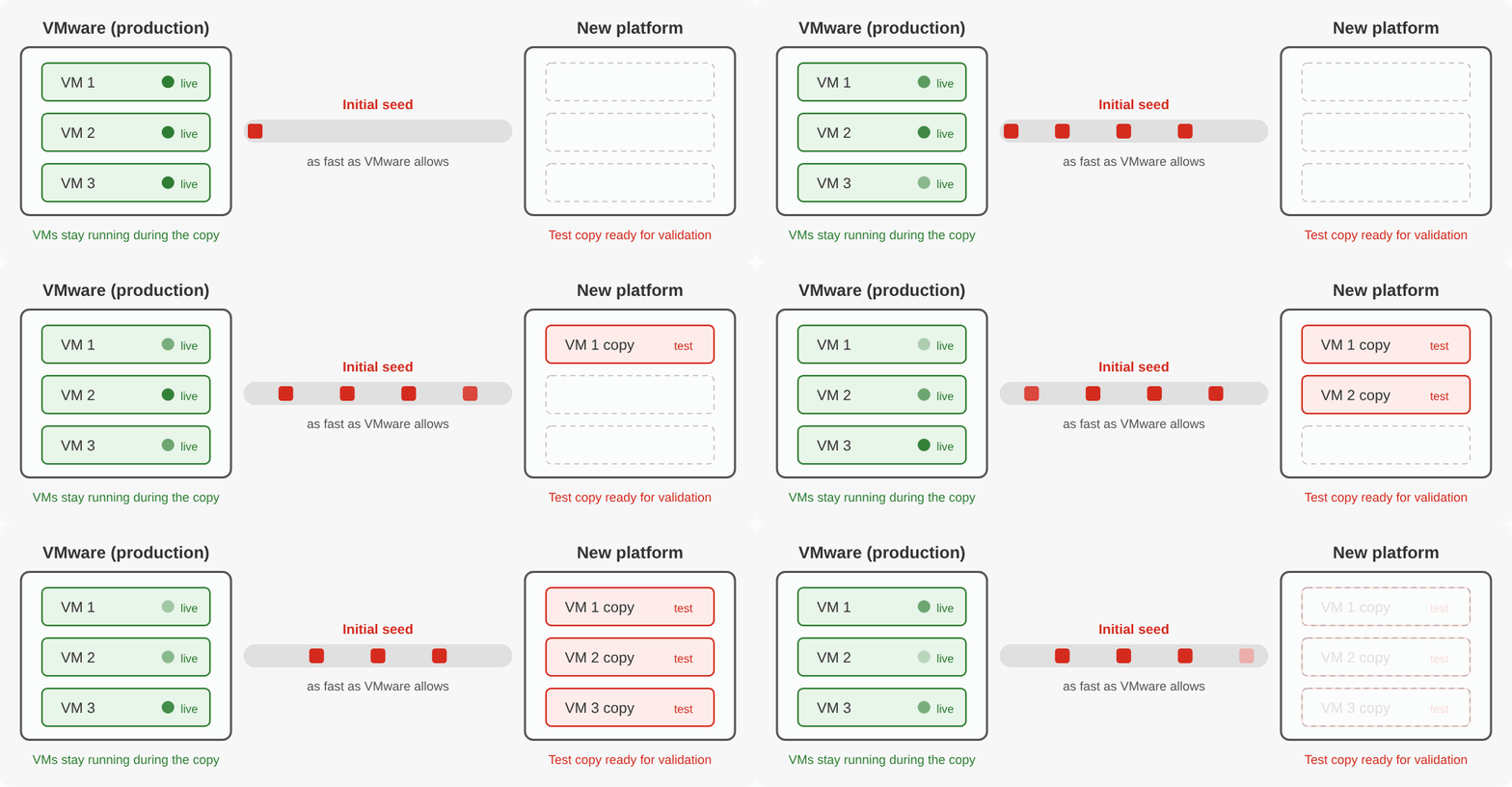
Initial data seeding seems simple enough. Copy from point A (VMware) to point B (the new platform). The first checkpoint is to ensure the migration function can copy or back up your VMware environment while the VMs remain active on the VMware side. This first seed is almost always your test seed. Use this copy to confirm that the applications running fine on VMware also work well on the new platform, so making the copy without interrupting production is critical.
The second part of initial data seeding is transfer time. VMware imposes some limits here, but will the migration function copy data as fast as VMware allows? Transfer speed determines how soon you can begin testing, and it affects how long a reseed takes if the first round of testing goes badly.
Requirement 2: Maintain the VMware State
The second requirement is to maintain the copy’s VMware state as it sits at rest on the new VMware platform. Maintaining state pays off when the initial tests go poorly, since nobody wants to reseed the entire environment every time something goes wrong. Some tools convert during the transfer. That gets you to a converted VM faster and with fewer steps, but if you need a retest, you have to copy all the data back from the VMware production hosts.
A sub-requirement of maintaining state is rapid conversion, turning the VMware copy held on the alternative platform into a native VM in that environment. We have seen a few examples of this happening in seconds. In fact, here is one example of a product converting and booting 100 VMs in less than ten seconds.
Requirement 3: Multi-Tenancy
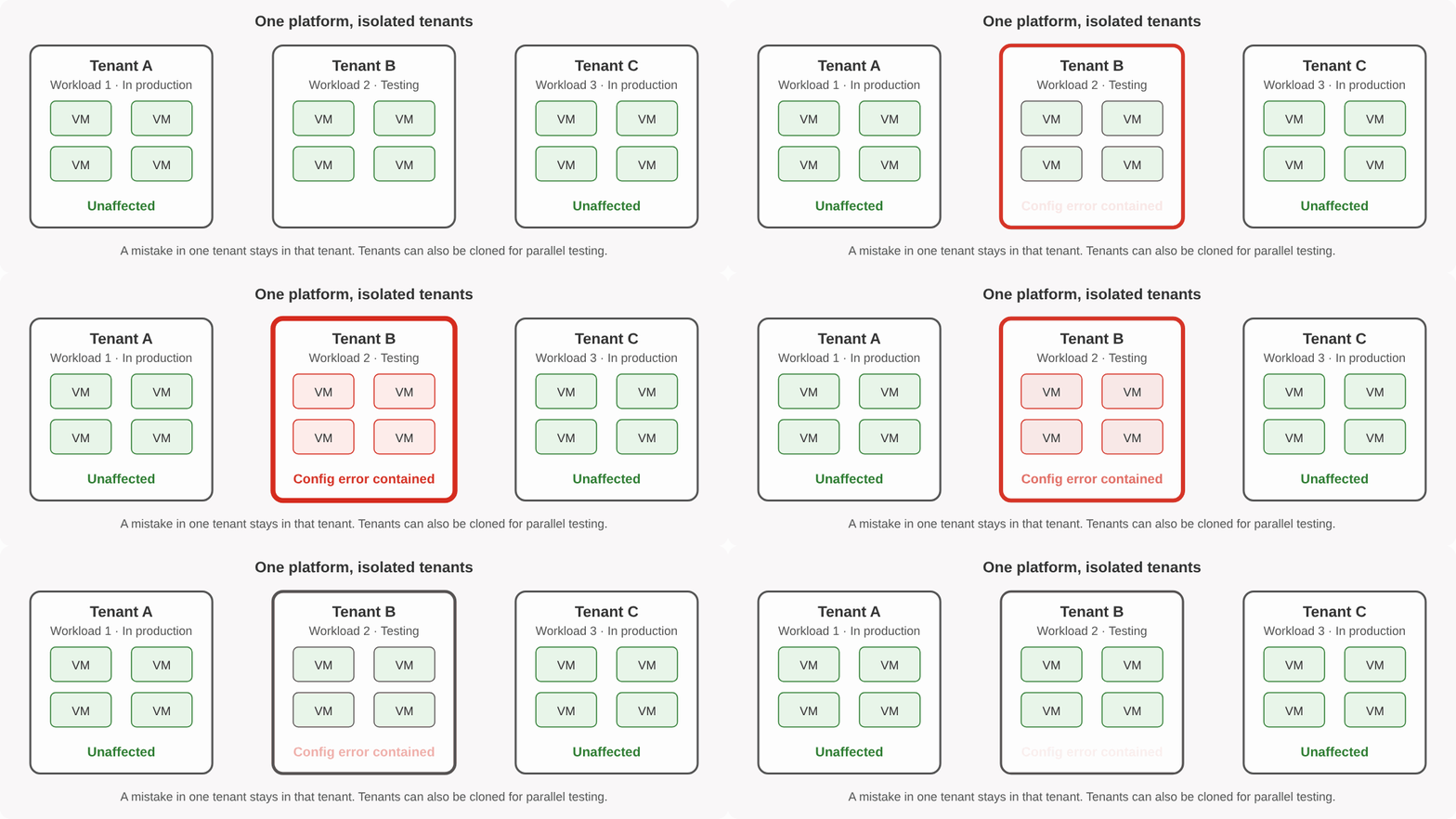
Why is multi-tenancy a requirement of a VMware migration? First, let’s get on the same page about what a tenant is. A tenant virtualizes a data center the same way a VM virtualizes a server. It encapsulates the data center, turning it into an object. These “virtual data center” objects are isolated from each other, so if something goes wrong in one, the others keep running.
One migration best practice is to migrate one workload at a time. Another is to start with your simplest workloads and work up to the more complex ones. If each workload goes into its own tenant, testing the next workload is isolated from the others. If something goes horribly wrong, only that workload is impacted.
The mistake can be small, too. I’ve personally seen a simple network configuration error of mine cause all my VMs to lose connectivity (after all, this is Storage Switzerland, not Network Switzerland). Tenant isolation keeps a simple user configuration mistake from impacting workloads that have already been tested, converted, and moved into production.
Tenants also enable much more complete, thorough testing. Take a workload made up of ten interdependent VMs supporting a complex, mission-critical application and dataset. You want that workload well vetted. Imagine putting it in its own tenant, then cloning that tenant five times so five members of your team, or maybe even an AI model, can run stress tests on all five copies simultaneously.
Requirement 4: Incremental Updates
Another key requirement is incremental updates of the maintained VMware state. A migration function that sends only the data that changed since the last pass makes the test-and-retest part of migration much more palatable. It is also the key to achieving the ideal migration scenario. With incremental updates, IT can back up a workload, convert it, place it in a tenant, and test it. During testing, the VMware version of the workload remains in production, and its data is being changed and added to. If testing passes and the migration function supports incremental updates, IT only needs to do a quick resync, shut down the VMware workload, and do one final import of the workload into the new platform. That final step is the power-off and power-on of the perfect scenario.
Requirement 5: Independent Snapshots
The ability to take independent snapshots of the tenant, the VM, or both during testing is also critical. Snapshots let you create checkpoints along the way. If one test fails, you need to roll the entire tenant back to the last known good state.
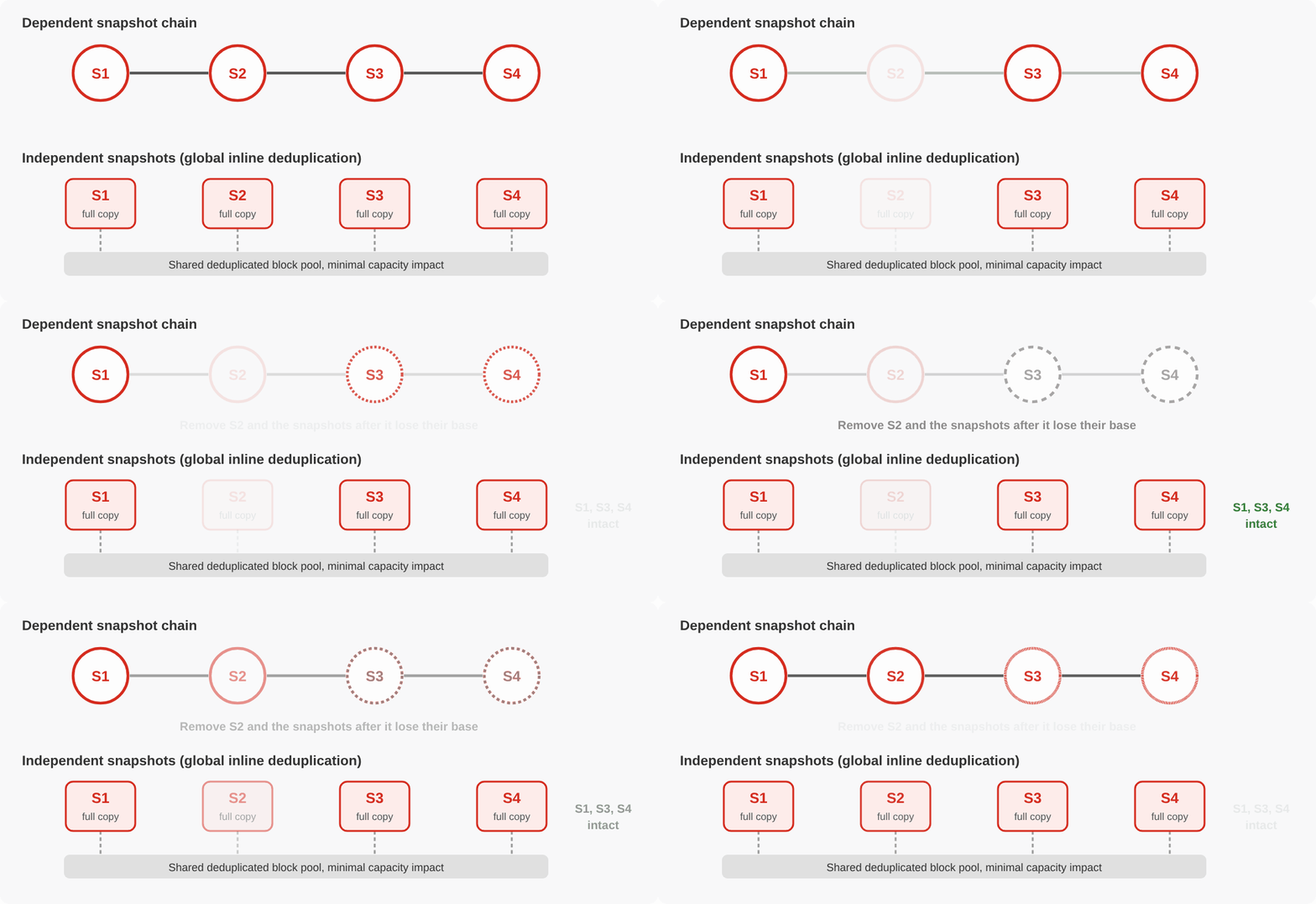
Independence matters just as much. Most snapshots are part of an interdependent, B-tree-like structure. Pulling a snapshot from the middle of that chain can be problematic, and deleting the first snapshot in the chain is almost impossible. Independent snapshots, typically fed by global inline deduplication, are full, independent copies of whatever was snapshotted. Thanks to deduplication, they have minimal capacity impact.
How VergeOS Meets These Requirements
VergeOS from VergeIO addresses each requirement in a single codebase. Its VMware migration service copies the full VM with the source still running on VMware, so the initial seed leaves production untouched. VergeOS 26.2 adds asynchronous I/O to its network block device (NBD) transfers. In VergeIO lab testing against VergeOS 26.1.8, transfers ran 2.2 times faster, cutting transfer time by about 55 percent. That shortens both the wait before testing starts and the time a reseed takes.
The VMware data stays at rest on VergeOS storage, so IT converts and boots VMs from that copy as many times as testing requires. That import is fast, as the 100-VM example above shows.
VergeOS virtual data centers (VDCs) provide the tenant. A VDC encapsulates VMs, virtual networks, storage and policies into a single object, and each VDC runs in its own network space, separate from other VDCs and from the host environment. IT snapshots and clones the entire VDC as one object, so the five-copy stress test described above starts with a handful of clone operations.
VergeOS handles incremental updates during migration. After the first full copy, each pass sends only the data that changed since the last one. At cutover, the source VM powers off, the final incremental update transfers and the VM boots on VergeOS, which is the reboot-length cutover of the perfect scenario.
VergeOS snapshots build on global inline deduplication in VergeFS, the storage layer built into VergeOS. Each snapshot is an independent, full copy of the VM or VDC, so IT rolls back to or deletes any snapshot in any order with minimal capacity impact.
Meeting the VMware Migration Requirements
The right VMware alternative turns migration into a repeatable process that IT can run workload by workload. Seed the data without touching production, keep the VMware state on the new platform, isolate each workload in its own tenant, resync only what changed, and checkpoint every test with independent snapshots. A platform that delivers all five gets each cutover down to a reboot and lets you move your most complex workloads with the same confidence as your simplest ones. To see VergeOS 26.2 meet these requirements live, join Aaron Richman and Dave Vincent on Thursday, October 22, at 12:00 PM CT for a demonstration of the release. Register for the VergeOS 26.2 webinar.
Frequently Asked Questions
How long should the outage be during a VMware migration?
Ideally about as long as a reboot. The VM powers off on VMware and powers on under the new platform, with all data already copied and only the final changes resynced.
Why migrate by workload instead of by VM?
Interrelated VMs, applications and data depend on each other. Moving and testing them as a group shows whether the application works on the new platform, which testing one VM at a time misses.
Why does multi-tenancy matter during a VMware migration?
Each workload tested in its own tenant is isolated from the others, so a configuration mistake during testing affects only that workload, and production workloads already moved stay protected. Tenants can also be cloned for parallel testing.
Why do incremental updates matter if the data is already copied?
Production keeps changing during testing. Incremental updates let IT resync only the new data before cutover instead of recopying the entire workload.
What makes a snapshot independent?
An independent snapshot is a full, self-contained copy, typically built on global inline deduplication, so any snapshot can be rolled back to or deleted without affecting the others and with minimal capacity impact.

George Crump is the Chief Marketing Officer at VergeIO, the leader in Ultraconverged Infrastructure. Prior to VergeIO he was Chief Product Strategist at StorONE. Before assuming roles with innovative technology vendors, George spent almost 14 years as the founder and lead analyst at Storage Switzerland. In his spare time, he continues to write blogs on Storage Switzerland to educate IT professionals on all aspects of data center storage. He is the primary contributor to Storage Switzerland and is a heavily sought-after public speaker. With over 30 years of experience designing storage solutions for data centers across the US, he has seen the birth of such technologies as RAID, NAS, SAN, Virtualization, Cloud, and Enterprise Flash. Before founding Storage Switzerland, he was CTO at one of the nation's largest storage integrators, where he was in charge of technology testing, integration, and product selection.


Leave a Reply