
Most midsize IT teams facing a VMware renewal have already lived through one infrastructure promise that went unkept. Hyperconverged infrastructure (HCI) arrived with two commitments that mattered to this market more than any other: simpler operations and lower hardware costs. Many of these organizations bought in, and many of them went back to a three-tier architecture of servers, a storage array and a network. Now Broadcom’s licensing changes are forcing a new platform decision, and on paper HCI looks like the obvious VMware alternative. Most evaluations focus on Day 1, the migration. A midsize team lives in Day 2, the upgrades, patches, drive failures, capacity additions and DR tests that fill every week after cutover. Before IT goes down that road a second time, it helps to understand why HCI fell short the first time and what has to change for the next platform to keep the promise.
Key Takeaways
- HCI promised midsize IT simpler operations and lower hardware costs and delivered neither. Vendors placed separate code bases behind a single management GUI.
- Strict HCLs and turnkey appliances forced new hardware purchases, so many midsize IT teams returned to three-tier architectures.
- A VMware alternative for a team of three to five needs a single, unified code base delivered as an infrastructure operating system.
- Running the new platform on existing servers protects the licensing savings from data center inflation.
Who the Midsize Enterprise Is
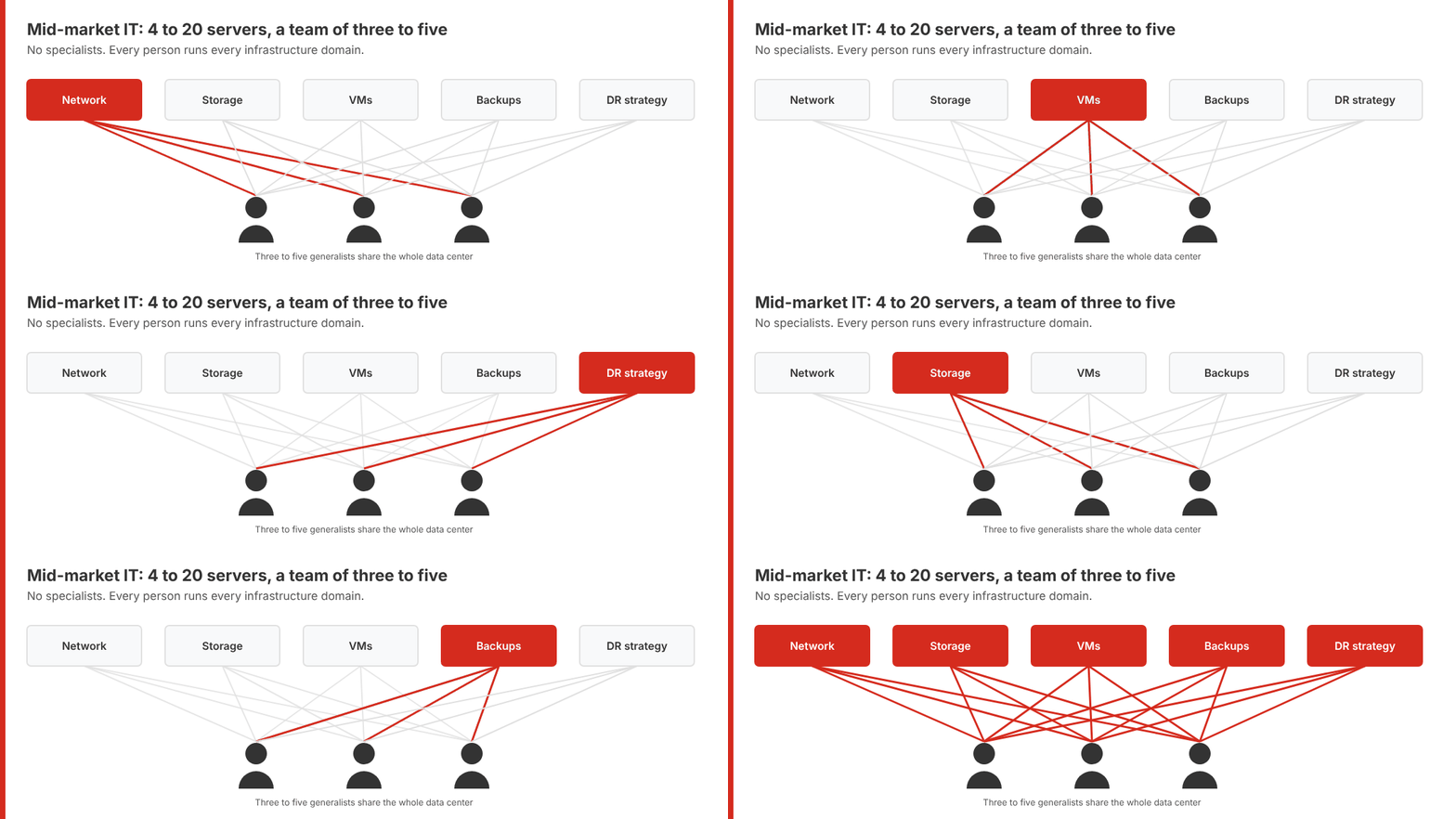
Everyone defines the midsize enterprise differently. For this article, a midsize enterprise runs 4 to 20 physical servers across all of its sites, typically a core data center plus a few smaller locations, with an IT team of three to five people who handle every aspect of data center management. There are no specialists. The same people manage the network, configure storage, create VMs for applications, maintain backups, and design the disaster recovery strategy, and most days they love it. They like the challenge, learning new things, and the variety. What they lack is time, and Day 2 work already consumes most of it. A platform that demands deep expertise in each infrastructure domain takes what is left.
Key Terms
Hyperconverged Infrastructure (HCI)
An architecture that runs a hypervisor, software-defined storage and software-defined networking on the same servers, typically as separate code bases presented through one management interface.
Day 2 Operations
The ongoing work after deployment, including upgrades, patches, drive failures, capacity additions and DR tests, which consumes most of a small IT team’s time.
Infrastructure Operating System
A single, unified code base that delivers virtualization, storage, networking, data protection, disaster recovery and automation as one product with one interface and one upgrade cycle.
Hypervisor Swap Trap
Replacing VMware’s hypervisor to cut licensing costs while keeping separate storage, networking and backup products, which leaves the same cost and complexity in place under a new logo.
Data Center Inflation
The year-over-year rise in hardware refresh, licensing, support and power costs on an environment that is not growing.
Why HCI Fell Short
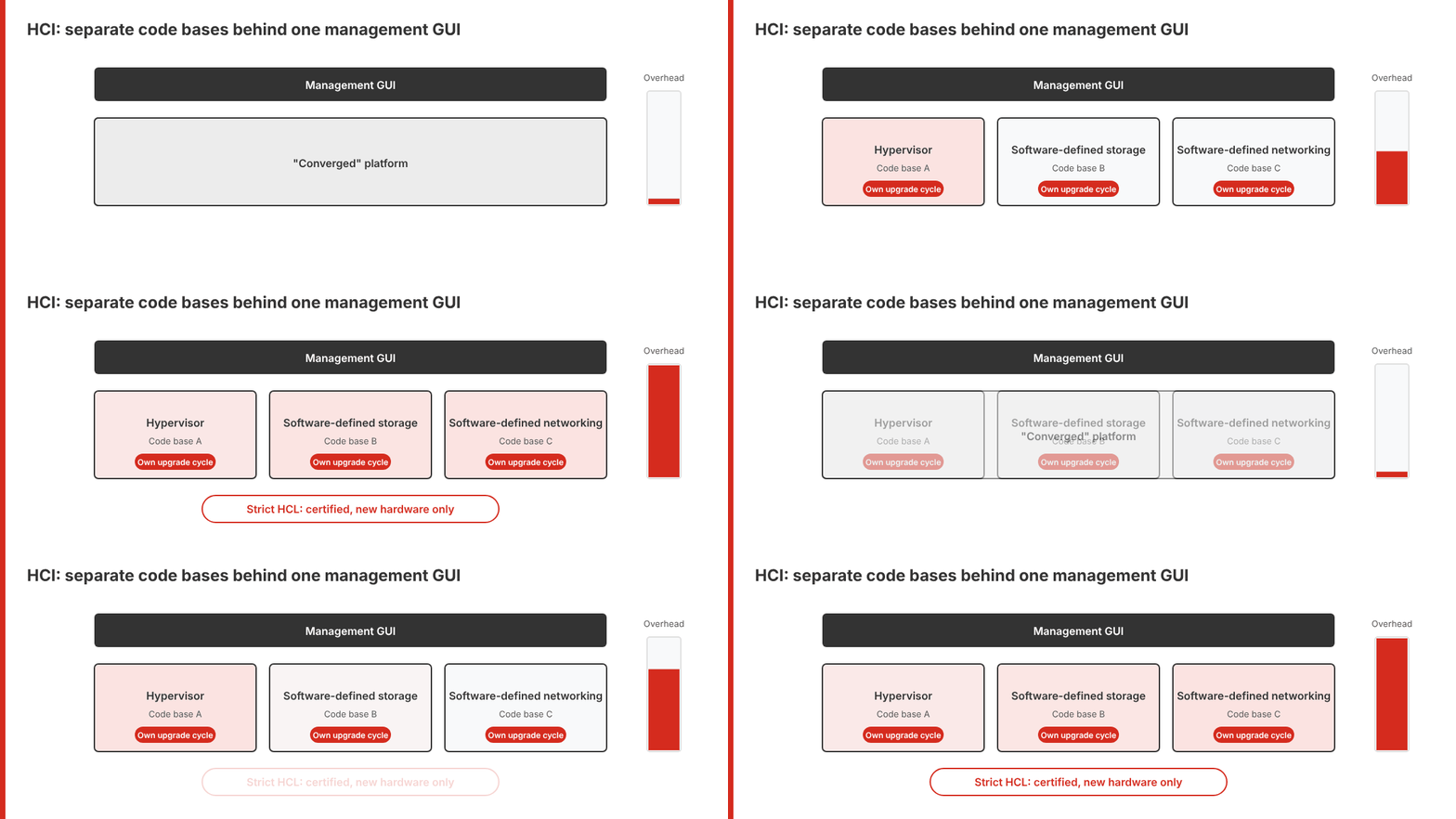
Almost all of this market tried hyperconverged infrastructure at some point, and a great many found it wanting. HCI was supposed to simplify infrastructure operations and reduce hardware costs. It did neither, and the reason is architectural. HCI never converged anything. Vendors took separate elements, a hypervisor, software-defined storage, and software-defined networking, and hid the fact that they were separate codebases behind a management GUI. That approach got vendors to market quickly at the cost of elegance.
The result was a heavy operating environment with high overhead. It was sluggish to move around in, and it still required expertise in each infrastructure domain, from virtualization and storage to networking, data protection and DR. The overhead and fragility pushed vendors to create strict hardware compatibility lists (HCLs) to contain the code’s shortcomings. Nutanix, Scale Computing, and Dell with VxRail moved to turnkey environments, forcing customers to buy new, expensive hardware. Even the more open option, VMware vSAN, required vendors to certify specific configurations as vSAN ReadyNodes. HCI looked simple on Day 1, but Day 2 exposed the separate code bases: each layer patched on its own schedule, compatibility checks before every update, and node additions limited to the HCL.
For a midsize team, that combination defeated the purpose. Simplicity required specialists, and lower costs required buying hardware. Many organizations either overlooked HCI or discarded it, and the classic three-tier architecture won out. Three-tier was harder to operate and cost more, but it was flexible, and flexibility won.
The Promise Was Right. The Architecture Was Wrong.
The VMware exit reopens the question. A consolidated platform running on a handful of servers is the right model for a team of three to five, and the HCI promise is still the right promise for this market. What has to change is the underlying architecture.
Simplicity comes first, so the stretched-too-thin team can move through its IT chore list quickly. The problem is that simplicity is hard to measure. Every vendor claims it, and a clean dashboard in a demo proves little about Day 2, how the platform behaves during an upgrade, a failed drive or a DR test. The better test is to look at the architecture and ask whether simplicity is its logical conclusion.
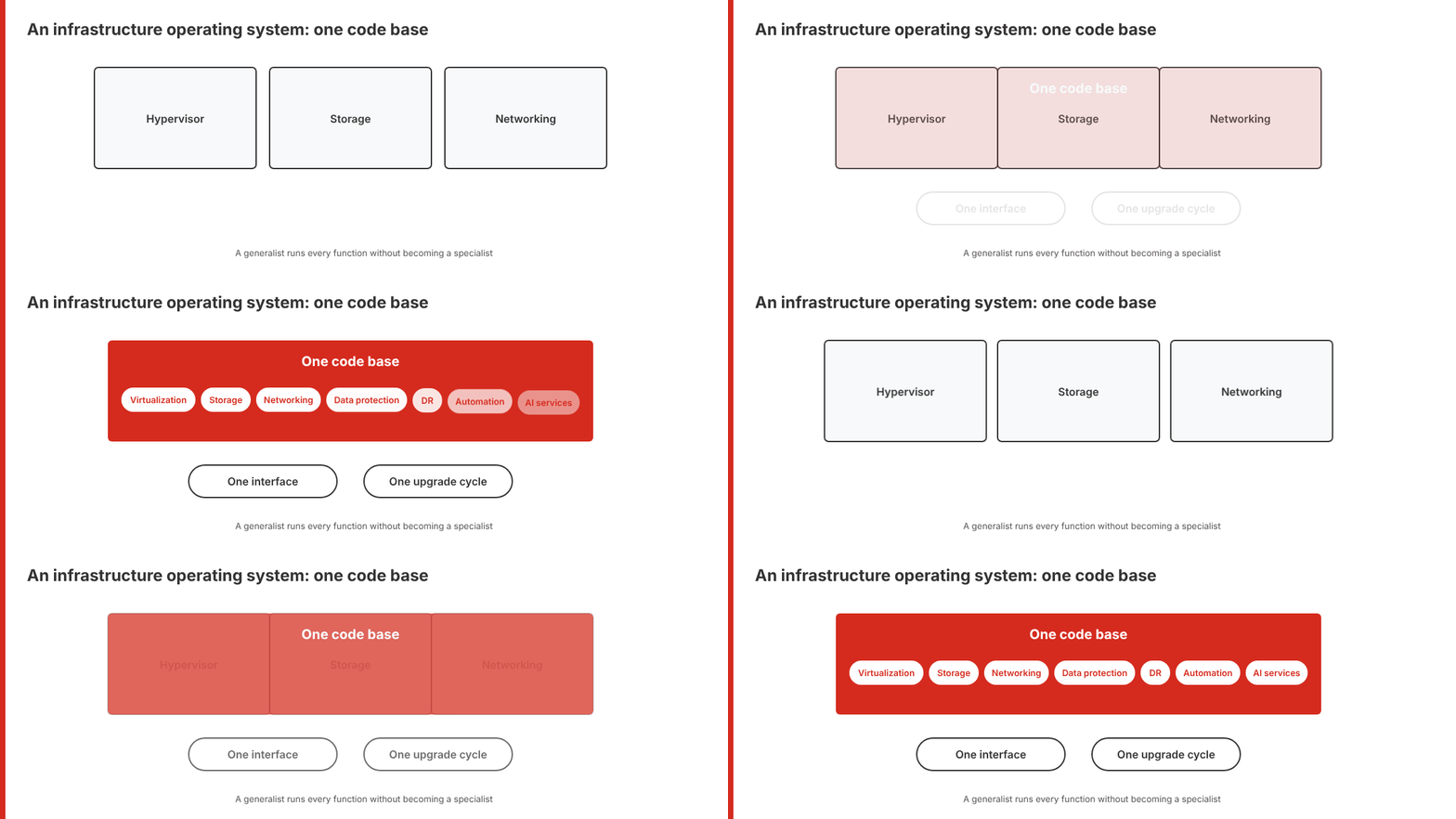
That architecture is a single, unified code base delivered as an infrastructure operating system. Virtualization, storage, networking, data resiliency, data protection, disaster recovery, automation, and AI services all live in one code base, with one interface and one upgrade cycle. Integrating every function this way lets a small IT team move through infrastructure management tasks quickly and efficiently, without anyone on the team becoming a storage specialist or a networking specialist.
Keep the Servers You Already Own
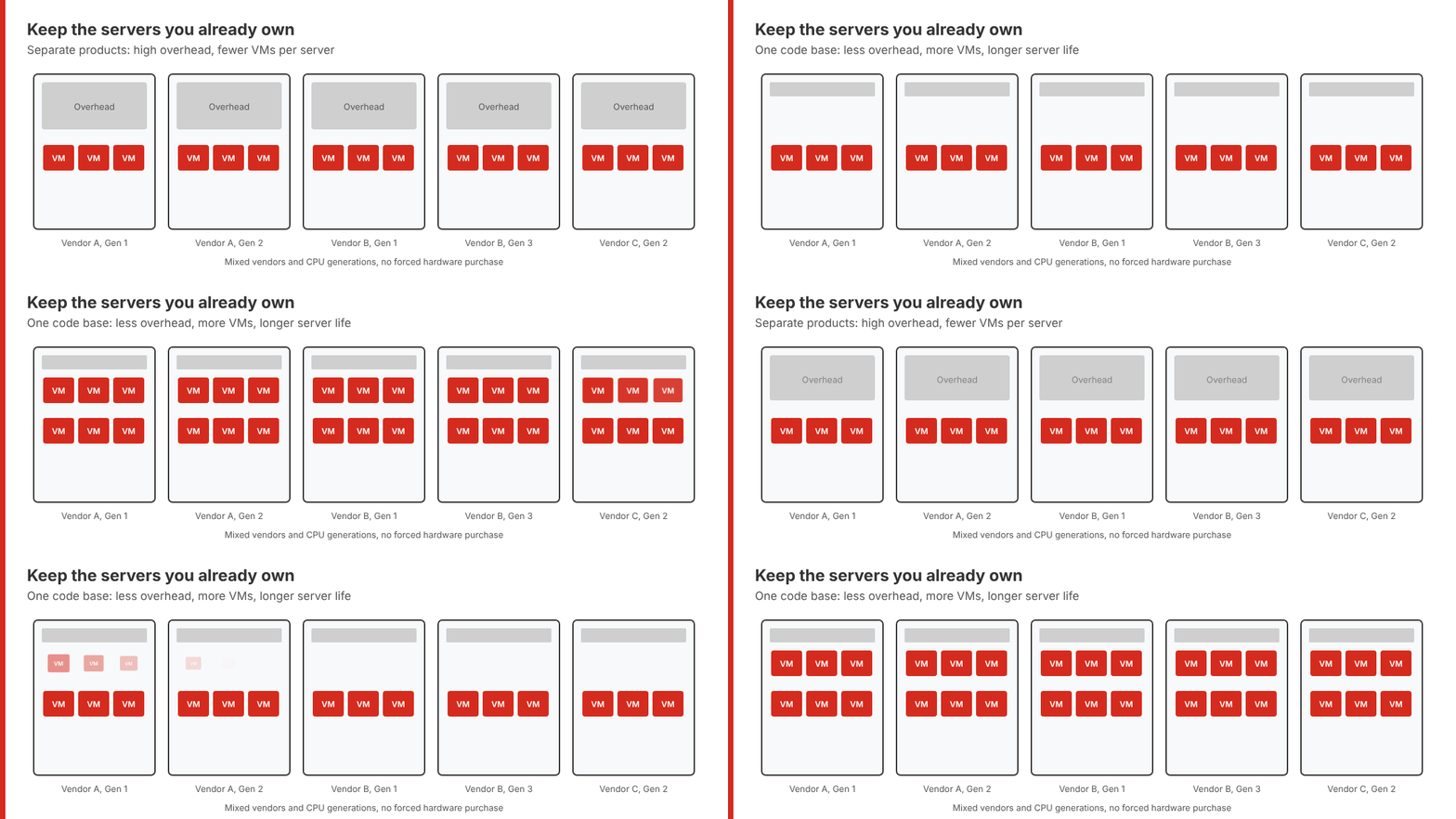
An infrastructure operating system also abstracts away the underlying hardware, with every function running in software. The platform doesn’t dictate a short list of certified nodes, so the organization runs it on servers already in its data center and avoids a forced hardware purchase. That matters more today than it did when HCI first arrived. Data center inflation has driven server prices sharply higher, and a VMware exit that starts with new hardware gives back much of the licensing savings that motivated the move.
A single code base also places less load on the physical servers than a stack of separate products. Lower overhead leaves more CPU and memory for workloads, so IT puts more VMs on each server and extends the useful life of hardware it already owns. For a team running 4 to 20 servers, that pushes the next refresh further out and keeps capital in the budget for other projects.
Avoid Repeating the HCI Mistake
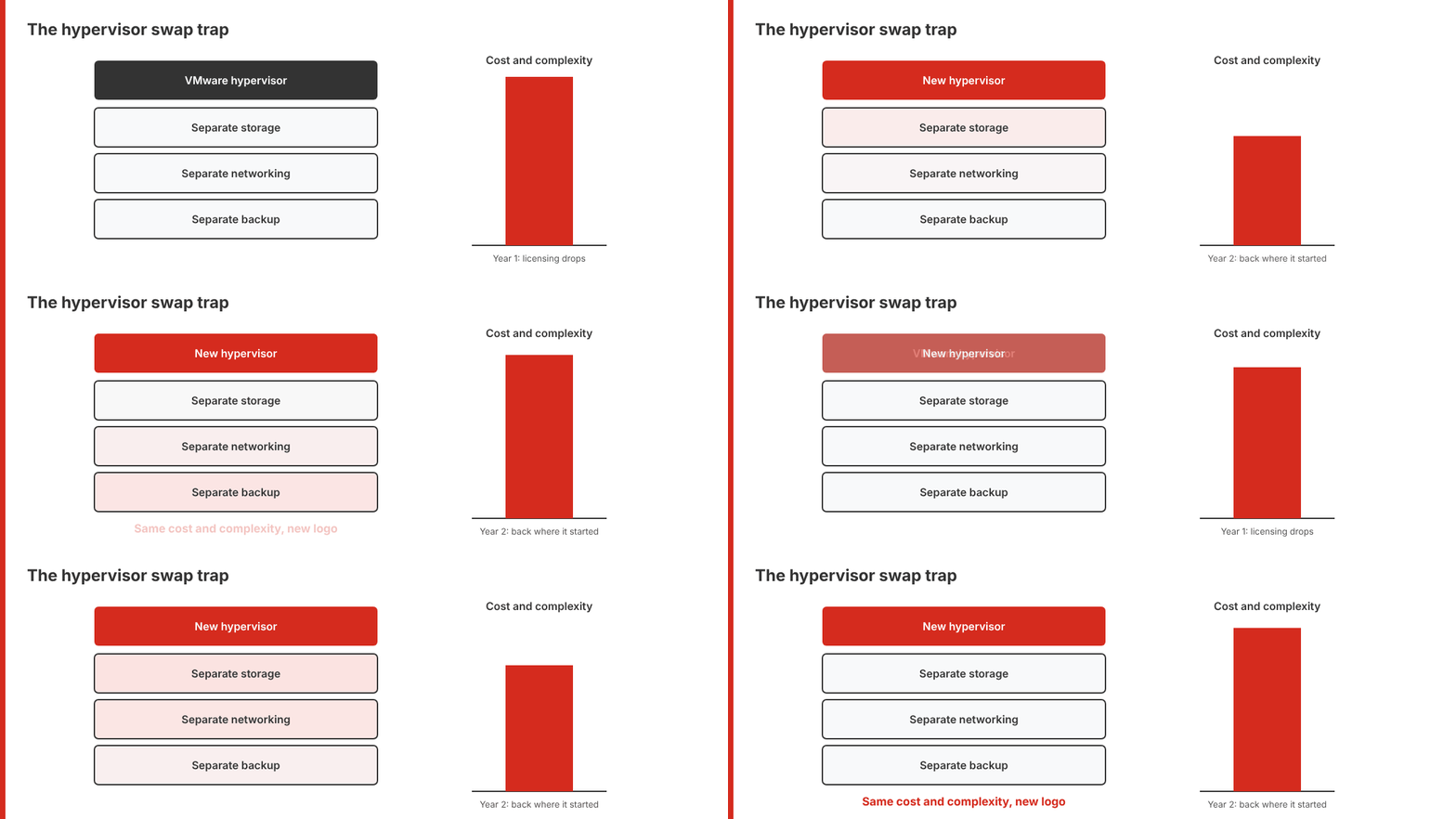
Almost any VMware alternative replaces the hypervisor and cuts the licensing bill. Stopping there is the hypervisor swap trap. It solves a Day 1 licensing problem and leaves every Day 2 problem in place. IT keeps separate storage, networking and backup products, and two years later faces the same costs and complexity under a new logo. Midsize IT already learned that lesson once with HCI. The platforms worth evaluating this time are the ones that deliver HCI’s original promise, one platform that a single generalist runs, on servers the organization already owns.
VergeOS as an Example of the Infrastructure Operating System
Full disclosure: I founded Storage Switzerland, and today I work at VergeIO, the company behind VergeOS.
VergeOS from VergeIO is one VMware alternative built on this architecture and running in production. It is a single piece of software that runs on bare metal and delivers virtualization, storage, networking, data protection and disaster recovery from one code base, with storage built into the platform instead of sitting on an external array. The IT team manages the entire environment through one interface and upgrades it as one product, so the same generalist who creates a VM also configures its storage and networking without switching consoles or calling a second vendor.
Those Day 2 advantages trace directly to how VergeOS was built. VergeIO did the hard engineering work up front, writing virtualization, storage, networking and data protection as one code base and delivering it as an infrastructure operating system. That investment is what lets an upgrade touch one product, lets the same software that runs the VMs handle a failed drive, and makes adding a server from a different vendor or CPU generation a routine task. HCI vendors took the faster path of putting separate code bases behind one console, and every upgrade, patch and expansion since has exposed the seams.
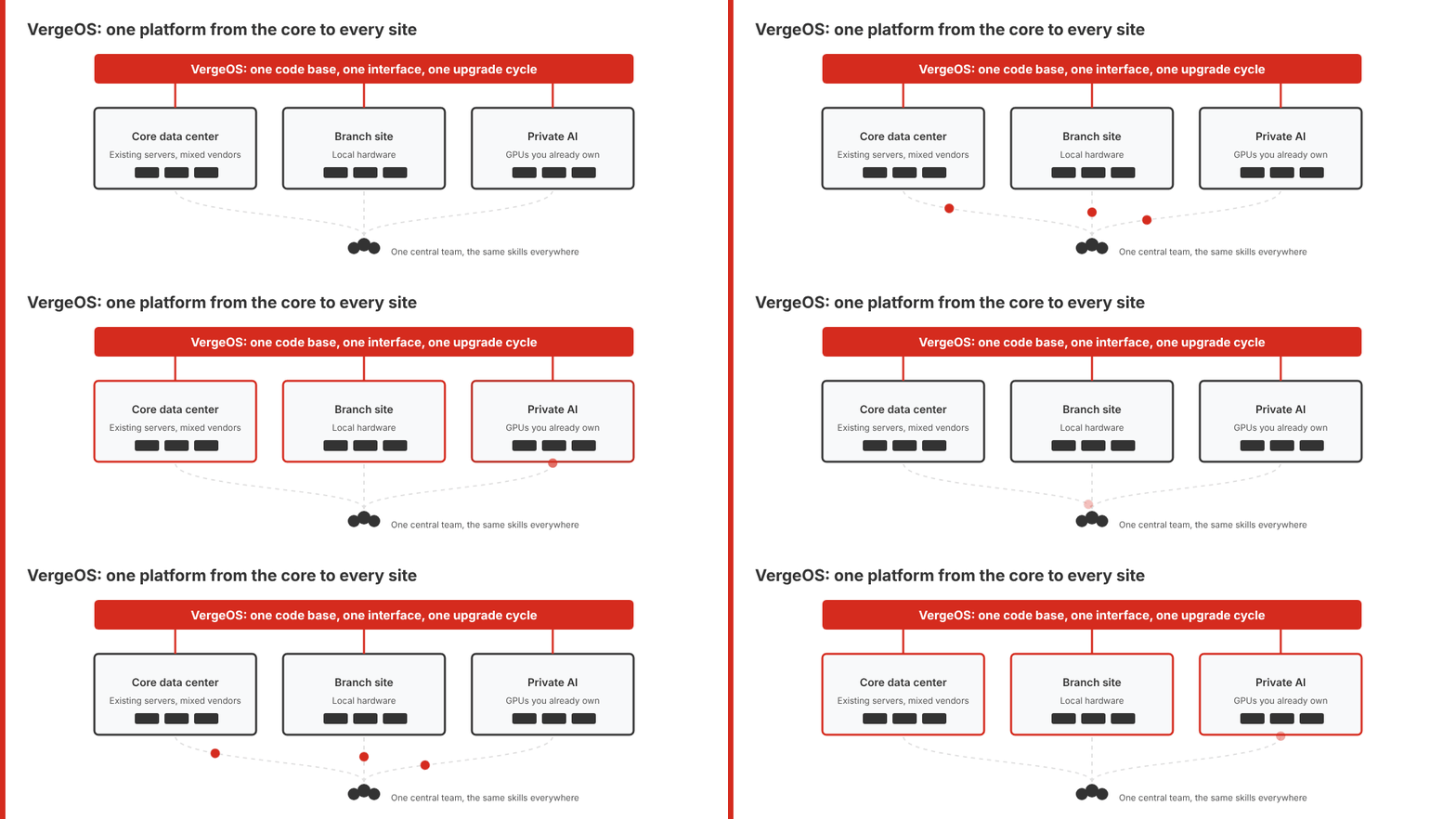
VergeOS runs on the servers the organization already owns. It mixes server vendors and CPU generations within the same instance, so a midsize team folds its existing hosts into the new platform and adds servers only when capacity calls for them. That is the flexibility three-tier offered and HCI took away, now paired with the operational simplicity HCI promised.
The model extends past the core data center. Each smaller site runs its own VergeOS instance on local hardware, managed by the same central team with the same skills. VergeOS also runs private AI on GPUs the organization already owns, which keeps sensitive data in-house and avoids the escalating token costs of cloud AI services. For a team of three to five, AI becomes another workload on the platform they already run instead of a new stack to buy, integrate and staff.
Live Webinar: VMware Alternatives for Mid-Market IT: Who Solves Day 2?
Join Aaron Richman and Dave Vincent of VergeIO on Wednesday, November 4, 2026, as they compare the leading VMware alternatives on the Day 2 problems that remain after the licensing bill comes down: infrastructure complexity, data center inflation, distributed sites, and AI cost and control.
Frequently Asked Questions
What counts as a midsize enterprise?
For this article, a midsize enterprise runs 4 to 20 physical servers across all of its sites and has an IT team of three to five generalists who manage every part of the data center.
What are Day 2 operations, and why do they matter in a VMware exit?
Day 2 operations are the upgrades, patches, drive failures, capacity additions and DR tests that follow the migration. The licensing savings arrive once. Day 2 work repeats every week, so a platform that simplifies it gives time back to the team for as long as it runs.
Why did HCI fall short for midsize IT?
HCI placed separate hypervisor, storage and networking code bases behind one GUI. The result was high overhead, a need for expertise in every domain, and strict HCLs that forced new hardware purchases.
What is the hypervisor swap trap?
It is a VMware exit that replaces only the hypervisor. IT keeps separate storage, networking and backup products and faces the same cost and complexity two years later.
Can an infrastructure operating system run on servers I already own?
Yes. With every function in software, the platform runs on existing servers. VergeOS, for example, mixes server vendors and CPU generations within the same instance.

George Crump is the Chief Marketing Officer at VergeIO, the leader in Ultraconverged Infrastructure. Prior to VergeIO he was Chief Product Strategist at StorONE. Before assuming roles with innovative technology vendors, George spent almost 14 years as the founder and lead analyst at Storage Switzerland. In his spare time, he continues to write blogs on Storage Switzerland to educate IT professionals on all aspects of data center storage. He is the primary contributor to Storage Switzerland and is a heavily sought-after public speaker. With over 30 years of experience designing storage solutions for data centers across the US, he has seen the birth of such technologies as RAID, NAS, SAN, Virtualization, Cloud, and Enterprise Flash. Before founding Storage Switzerland, he was CTO at one of the nation's largest storage integrators, where he was in charge of technology testing, integration, and product selection.


Leave a Reply